The best airbnb automation tools 2026 has to offer are Hospitable (guest messaging and task automation starting at $40/month), PriceLabs (dynamic pricing at $19.99/listing/month), Turno (cleaning coordination with free scheduling), and a smart lock system like Schlage Encode Plus or Yale Assure Lock 2 for self-check-in. These four tools cost under $100/month for a single listing and eliminate roughly 80% of the repetitive tasks that crush new hosts. If you’re running rental arbitrage, automation isn’t optional. It’s the difference between a side hustle and a real Airbnb business.
I managed my first three properties with spreadsheets, manual pricing, and a phone that never stopped buzzing. Guest communication alone ate 2-3 hours daily. By property four, I was drowning. Then I built a proper tech stack. Within 60 days, I cut my daily management time from 4+ hours to about 45 minutes, and my revenue went up 23% because dynamic pricing tools caught demand spikes I’d been missing entirely.
This guide breaks down every automation tool category, names specific products with real pricing, and gives you a scaling roadmap so you add each tool at the right time. No fluff. No affiliate-driven recommendations. Just what actually works for hosts managing one unit or fifty.
Why Airbnb Automation Matters More Than Ever in 2026
Rental arbitrage has a math problem most new hosts don’t see coming. Every unit you add multiplies your operational load: more guest messages, more turnovers, more pricing adjustments, more maintenance coordination. Without automation, your workload scales linearly with your portfolio. With the right automation tools, it doesn’t.
A single Airbnb listing generates roughly 15-25 guest messages per booking, requires pricing updates 3-7 times per week to stay competitive, and needs cleaning coordination after every checkout. Multiply that by 5 units and you’re looking at 75-125 messages, 15-35 pricing decisions, and 20+ cleaning schedules every week. That’s a full-time job, and you haven’t even handled maintenance requests or the onboarding steps for new properties.
The hosts who scale to 10, 20, even 50 units through arbitrage aren’t working 10x harder. They built systems. AI adoption among short-term rental operators jumped from 60% to 84% in a single year, with 78% of property managers now viewing AI-driven automation as critical for scaling, according to Avantio’s 2026 industry report. That’s not a trend. That’s a survival requirement for anyone serious about building a vacation rental business.
The real cost of NOT automating isn’t just your time. It’s the revenue you leave on the table. Manual pricing misses demand spikes. Slow guest communication response times tank your search ranking on Airbnb. Forgotten review requests mean fewer 5-star ratings, which directly impacts guest reviews and your position in search results. Every manual process is a leak in your revenue bucket.
The Complete Airbnb Automation Tech Stack
Before I break down individual tools, here’s the full map. Every successful arbitrage operation I’ve studied uses some version of this architecture:
| Category | What It Does | When to Add | Monthly Cost Range |
|---|---|---|---|
| Property Management Software (PMS) | Central hub: calendar sync, channel manager, messaging | Day 1 | $29–$100+ |
| Dynamic Pricing | Automated rate optimization based on market data | Day 1 | $20–$40/listing |
| Guest Communication | Automated guest messaging sequences, AI responses | Day 1 (often built into PMS) | $0–$40 |
| Cleaning Management | Auto-schedule turnovers, coordinate cleaners | Unit 3+ | $0–$8/property |
| Smart Locks & Access | Keyless entry, auto-generated codes | Unit 2+ | $0 ongoing (hardware only) |
| Noise Monitoring | Party prevention, neighbor complaint reduction | Unit 5+ | $10–$15/device |
| Direct Booking Website | Accept bookings without OTA fees | Unit 5+ | $0–$50 (built into some PMS) |
| Accounting & Financial | Income/expense tracking, tax prep | Unit 3+ | $0–$30 |
| Task Management | Maintenance requests, supply restocking, team coordination | Unit 5+ | $0–$20 |
Your property management system is the brain of the operation. Everything else plugs into it. Choose the wrong PMS and you’ll be ripping out the foundation later. Choose the right one and adding tools is like snapping in Lego blocks.
Property Management Software: The Foundation of Your Operation
Your property management software is the single most important decision you’ll make. It’s where your calendar lives, where guest data flows, where your channel manager prevents double bookings across Airbnb, VRBO, and Booking.com. Get this wrong and every other tool choice becomes harder.
I’ve used or tested five PMS platforms across multiple properties. Here’s what I actually recommend based on portfolio size:
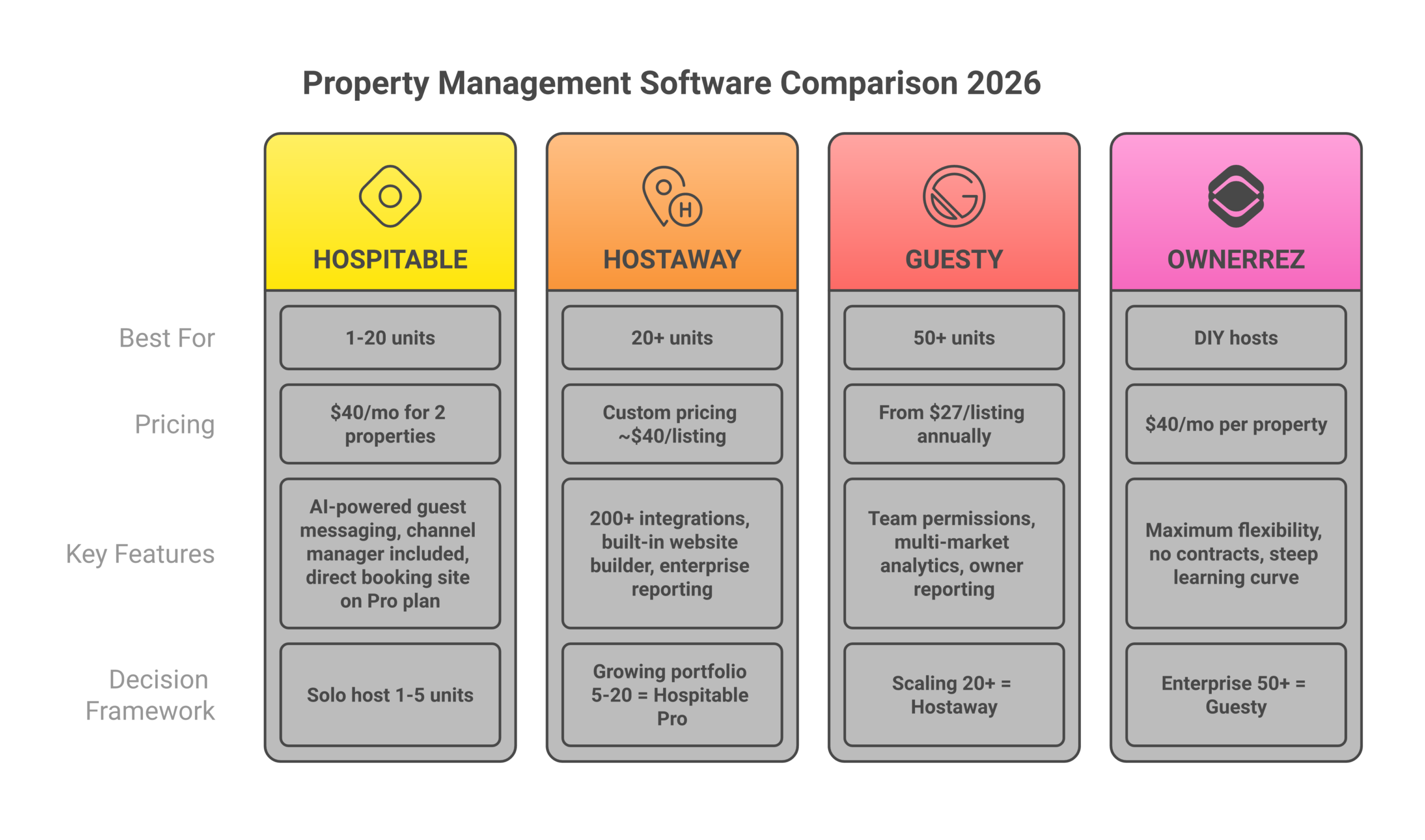
Hospitable, Best for Arbitrage Hosts (1-20 Units)
Hospitable (formerly Smartbnb) is what I run on most of my properties. It started as a guest messaging tool and evolved into a complete guest experience platform. The automated guest messaging alone saves me 10+ hours per week across my portfolio.
Pricing starts at $40/month for two properties, then $15/month per additional property on the Host plan. The Professional plan runs $30/month per additional property but includes a direct booking website builder and owner portals.
What makes it stand out: Hospitable’s AI-powered guest communication handles about 90% of routine guest messages without my intervention. Check-in instructions, house rules reminders, checkout procedures, local recommendations, all automated based on booking triggers. When a guest asks something the AI can’t handle, it flags me immediately. The guest journey from inquiry to review request runs on autopilot.
Limitations: The channel manager works well for Airbnb and VRBO but has occasional sync delays with Booking.com. Not ideal for large scale property managers running 50+ units who need enterprise-grade features.
Hostaway, Best for Scaling Past 20 Units
Hostaway is the PMS I’d pick if I were starting with 10+ units or had plans to scale aggressively. It’s more expensive, custom pricing starting around $40/listing/month, but the feature set justifies it for property managers running multiple listings across many channels.
Key strengths: 200+ integrations with other vacation rental tools, built-in website builder for direct bookings, strong financial reporting, and an API that lets you connect virtually anything. Their channel manager is one of the most reliable I’ve tested for preventing double bookings.
Best for: Property owners and property managers who plan to scale past 20 units, need enterprise reporting, or want to build a direct booking site without third-party tools.
Guesty, Best for Enterprise Operations (50+ Units)
Guesty targets larger operations. Their Lite plan starts at $27/listing/month (annual billing) or $39/listing/month (monthly), with a minimum of three listings. The Pro and Enterprise tiers require custom quotes but unlock multi-unit management, revenue management, and team workflows that smaller platforms can’t match.
When to consider Guesty: You’re managing 50+ properties, have a team, and need granular permissions, owner reporting, and multi-market analytics. For a solo operator running 3-10 arbitrage units, it’s overkill.
OwnerRez, Best for DIY-Minded Hosts
OwnerRez starts at $40/month for one property, no setup fees, no contracts. It’s built by a small team that obsesses over flexibility. You can customize virtually everything, email templates, rental agreements, payment rules, and channel integrations.
Trade-off: More configuration required upfront. OwnerRez gives you the tools but expects you to build your own workflows. Experienced property owners love it. New hosts often find the learning curve steep.
PMS Comparison Table
| PMS | Starting Price | Best For | Channel Manager | Guest Messaging | Direct Booking Site |
|---|---|---|---|---|---|
| Hospitable | $40/mo (2 properties) | 1-20 units, arbitrage hosts | Yes | AI-powered | Yes (Pro plan) |
| Hostaway | ~$40/listing/mo (custom) | 20+ units, scaling operators | Yes (200+ integrations) | Automated | Yes (built-in) |
| Guesty | $27/listing/mo (annual) | 50+ units, enterprise teams | Yes | Automated | Yes |
| OwnerRez | $40/mo (1 property) | DIY hosts, max flexibility | Yes | Template-based | Yes |
| Lodgify | $29/mo (1 property) | Budget hosts, direct bookings | Yes | Basic | Yes (primary feature) |
Dynamic Pricing Tools: Stop Leaving Money on the Table
Manual pricing is the most expensive mistake in the short term rental business. I ran my first two properties on gut-feel pricing for six months before switching to PriceLabs. Revenue jumped 19% in the first 30 days. Not because the tool is magic, because it catches demand signals I was missing. A local concert, a holiday weekend, a competing listing going offline. Dynamic pricing tools process thousands of data points daily that no human can track manually.
PriceLabs, The Industry Standard for Arbitrage Hosts
PriceLabs costs $19.99/listing/month in the US, with volume discounts kicking in from the second listing. They also offer a 1% of revenue billing option, which can work for low-ADR listings but gets expensive fast on high-revenue properties.
Why I recommend it first: The customization depth is unmatched. You can set minimum/maximum prices, day-of-week adjustments, orphan day pricing, last-minute discounts, and far-out premiums. The neighborhood data pulls from actual booking patterns, not just listed prices. Their hyper-local algorithm adjusts for micro-market demand within your specific zip code.
The 30-day free trial gives you enough time to see real results before committing. Connect it, let it run for a month alongside your manual prices (most PMS platforms let you preview suggested rates without auto-applying), and compare.
Beyond Pricing, Simpler but More Expensive at Scale
Beyond Pricing charges 1% of your booking revenue instead of a flat per-listing fee. For a listing generating $3,000/month, that’s $30/month, competitive with PriceLabs. But at $6,000/month revenue, you’re paying $60/month per listing. It adds up.
Best for: Hosts who want a set-it-and-forget-it dynamic pricing tool with minimal configuration. Beyond requires less setup than PriceLabs but offers fewer customization levers.
Wheelhouse, The Middle Ground
Wheelhouse offers both flat-rate ($19.99/listing) and percentage-based (1% of revenue) pricing. Their market dashboards give solid competitive intelligence, showing how your pricing compares to similar listings in your area.
Dynamic Pricing Tool Comparison
| Tool | Pricing Model | Cost (Single Listing at $4K/mo Revenue) | Customization Depth | Best For |
|---|---|---|---|---|
| PriceLabs | $19.99/listing/mo | $19.99/mo | Deep (orphan days, min stays, day-of-week) | 3+ units, arbitrage operators |
| Beyond Pricing | 1% of revenue | $40/mo | Limited (mostly automated) | 1-2 units, simplicity seekers |
| Wheelhouse | $19.99/listing or 1% | $19.99-$40/mo | Moderate | Hosts wanting market dashboards |
For a deeper breakdown of how these three tools compare head-to-head, read my full Airbnb pricing strategy guide.
Guest Communication Automation: The Guest Experience Multiplier
Guest satisfaction lives and dies on communication speed and quality. Airbnb’s algorithm rewards hosts who respond within 15 minutes. Guests who feel ignored leave bad reviews. And bad guest reviews kill your search ranking faster than anything else.
Automated guest messaging handles the predictable touchpoints in the guest journey so you can focus on the exceptions. Here’s the message sequence I automate for every booking:
- Booking confirmation – Sent immediately. Thanks them, sets expectations, links to house rules
- Pre-arrival (3 days out) – Check-in instructions, parking details, Wi-Fi password, local recommendations
- Check-in day (morning) – Reminder with access codes, “text me if anything” personal touch
- Day 1 check-in – “How’s everything? Need anything?” Catches problems early
- Pre-checkout (evening before) – Checkout instructions, reminder of checkout time
- Post-checkout – Thank you + review request
Six messages. Each one triggered automatically. Total time to set up: about 45 minutes. Time saved per booking: 15-30 minutes of manual messaging.
Guest Experience Tools Worth Considering
Beyond basic automated guest messaging, several guest experience tools can enhance the entire guest journey:
Hostfully Digital Guidebooks ($79/month for the full platform) let you create custom guidebooks with local recommendations, house rules, appliance instructions, and emergency contacts. Guests access them via a link in their pre-arrival message. This single tool cut my “how does the TV work” messages by about 70%.
StayFi (starting at $10/property/month) captures guest data through a branded Wi-Fi splash page. When guests connect to your Wi-Fi, they enter their email. You build a guest database for marketing direct bookings later, critical if you’re planning to reduce OTA dependency with a direct booking website.
The goal with any complete guest experience platform isn’t just efficiency. It’s consistency. Every guest gets the same high-quality communication regardless of whether I’m on a beach or stuck in a meeting. Guest satisfaction scores stay high because the system never forgets a message, never sends late, never misses a checkout reminder.
Smart Locks and Self Check-In: Eliminate the Key Exchange
Smart locks are the single highest-ROI hardware investment for any Airbnb host. They eliminate the key exchange problem entirely. No lockboxes with codes that neighbors memorize, no driving to meet guests at 11 PM, no lost key panics.
Best Smart Locks for Airbnb in 2026
Schlage Encode Plus ($280-$320), My top pick. Built-in Wi-Fi (no hub needed), Apple Home Key support, and it integrates directly with most property management software. Battery lasts 6-12 months. Looks like a regular deadbolt, which matters when your landlord reviews your lease.
Yale Assure Lock 2 ($200-$260), Works with multiple smart home ecosystems (Wi-Fi, Zigbee, Z-Wave, Matter). Slightly cheaper than the Schlage but requires a Wi-Fi module add-on ($30) for remote access. Solid choice if you’re already in the Yale ecosystem.
August Wi-Fi Smart Lock (4th Gen) ($230-$280), Installs over your existing deadbolt, so it doesn’t replace the exterior hardware. Good for rental arbitrage because it’s less visible from the outside. Your landlord won’t notice. Auto-lock and DoorSense features are reliable.
How Smart Locks Connect to Your Automation Stack
The real power isn’t the lock itself. It’s the integration with your PMS. When a guest books through Airbnb, your property management system creates a unique access code and sends it via automated guest messaging 24 hours before check-in. The code expires at checkout. No manual intervention required.
Most property management software platforms (Hospitable, Hostaway, Guesty) have native smart lock integrations. If yours doesn’t, tools like RemoteLock ($4/lock/month) or Operto ($6/lock/month) bridge the gap and support multiple listings from a single dashboard.
One warning: don’t rely solely on Bluetooth-only locks. They require the guest to download an app, which creates friction. Always choose Wi-Fi-enabled smart locks that support PIN codes. Guests punch in a number. Done. No app download, no pairing issues, no “the Bluetooth won’t connect” messages at midnight.
Cleaning and Turnover Management
Cleaning coordination becomes a logistical nightmare around property three or four. You’re texting multiple cleaners, tracking who’s available when, confirming completions, and handling no-shows. Turnover management tools solve this entirely.
Turno (Formerly TurnoverBnB), Best for Most Hosts
Turno connects to your PMS calendar and auto-schedules cleanings based on checkout/check-in times. Your cleaners get notified, confirm the job, complete a photo checklist, and mark it done. You see the status in real time.
Pricing: If you use Turno’s marketplace to find cleaners, there’s no subscription fee. They take a 5% commission on cleaning payments plus 3.9% payment processing. If you bring your own cleaners and just want the scheduling/coordination features, it’s free. This makes Turno essentially a zero-cost automation tool for hosts who already have reliable cleaners.
The photo checklist feature is the real differentiator. Cleaners photograph each room after cleaning, following a checklist you create. You verify remotely. No more driving to properties to inspect turnovers. I’ve caught stained sheets, missed trash, and a broken lamp, all from photo checklists, before the next guest arrived.
Properly, Premium Alternative
Properly ($7/month per property) offers similar scheduling plus detailed visual inspection checklists. Their quality assurance workflow is more strong than Turno’s, but the per-property cost adds up when you’re managing multiple properties.
Channel Manager: Prevent Double Bookings Across Platforms
If you’re listing on Airbnb, VRBO, and Booking.com simultaneously, and you should be, a channel manager is non-negotiable. Double bookings destroy your reputation and cost real money in relocation fees and refunds.
Most modern property management software includes a built-in channel manager. Hospitable, Hostaway, and Guesty all sync calendars across platforms in near real-time. If you’re using a standalone PMS without channel management, tools like Rentals United or NextPax fill the gap.
The key metric to watch is sync speed. Some channel managers update calendars every 15 minutes. Others push changes in under 2 minutes. When you get a booking at 3:47 PM on Airbnb, and another guest tries to book the same dates at 3:49 PM on VRBO, that 2-minute sync vs. 15-minute sync is the difference between a smooth operation and a hosting nightmare. Ask about sync speeds before committing to any management software.
Direct Booking Website: Cut OTA Fees and Own Your Guest Data
Every booking through Airbnb costs you 3% in host fees (sometimes more with new fee structures). VRBO takes 5%. Booking.com takes 15%. On a $200/night booking for 3 nights, that’s $18-$90 per booking walking out the door. Multiply that across your portfolio and the numbers get painful fast.
A direct booking website lets property owners accept reservations without OTA commissions. More importantly, it gives you guest data, email addresses, phone numbers, booking history, that OTAs deliberately hide from you. That guest data powers email marketing for repeat bookings and referrals.
How to Set Up a Direct Booking Site
You have three realistic options:
- PMS-built website – Hospitable (Pro plan), Lodgify, and Hostaway include direct booking site builders. Lodgify’s is arguably the best, designed specifically for vacation rental direct bookings. These are the fastest to launch (under a day) but offer limited design customization.
- WordPress + booking plugin – More work to set up but far more flexible. Plugins like Jetrocket or Jetveo connect to your PMS calendar. Better for hosts who want full control over branding and content marketing.
- Standalone platforms – Boostly ($49/month) specializes in direct booking websites for short-term rental hosts. Includes payment processing, booking engine, and basic CRM.
I cover the full strategy for building and driving traffic to your direct booking website in a separate guide. The key takeaway: you don’t need a direct booking site on day one, but by unit five, the OTA fee savings make it worth the investment.
Noise Monitoring and Property Protection
Parties are an arbitrage host’s worst nightmare. One noise complaint from a neighbor can get you a lease violation, or worse, eviction. Noise monitoring devices are cheap insurance.
Minut ($12/device/month, hardware ~$150) monitors noise levels, occupancy (via motion detection), and cigarette smoke. When noise exceeds your threshold, it sends alerts to you and can trigger automated guest messaging: “Hi [Guest], our noise sensor detected elevated sound levels. Please keep noise to a reasonable level per the house rules. Thank you!”
NoiseAware ($10/device/month, hardware ~$200) is the other major player. Similar functionality, slightly different hardware design. Both integrate with major PMS platforms.
These aren’t recording devices. They measure decibel levels only. Fully legal, no privacy concerns, and they’re Airbnb-approved. I install one per unit, usually in the main living area. The ROI math is simple: one prevented party justifies years of monitoring costs. And the automated guest communication about noise levels handles most situations before they escalate.
Task Management and Team Coordination
At 5+ units, you’re not doing everything yourself anymore. You have cleaners, a handyman, maybe a co-host. Task management becomes critical for tracking maintenance requests, supply restocking, and property inspections.
Breezeway ($8-$15/property/month) is purpose-built for vacation rental task management. It creates automated task workflows: after checkout, trigger cleaning. After cleaning, trigger inspection checklist. After inspection, mark property “guest ready.” Every routine task in your operation can be sequenced and assigned.
For smaller operations (under 10 units), you can get away with Hospitable’s built-in task features or even a shared Trello/Notion board. The key is having a single system where nothing falls through the cracks. When a guest reports a broken dishwasher, that message needs to become an assigned task with a deadline. Not a text message you forget about during a busy weekend.
Accounting and Financial Tracking for Your Airbnb Business
Taxes for a short term rental business are complicated enough without manual spreadsheets. You need to track revenue per property, deductible expenses (cleaning, supplies, tools, insurance, rent if arbitraging), and potentially sales/occupancy tax collection.
QuickBooks Self-Employed ($15/month) handles most solo operators. Connect your bank accounts, categorize transactions, and track mileage. It integrates with some PMS platforms for automated income categorization.
Stessa (free for basic, $12/month for pro) is designed specifically for real estate investors. Better for tracking property-level P&L, which matters when you’re deciding whether to renew a lease or drop a non-performing unit. If you want to see your actual profit numbers per property, Stessa is the better choice.
The non-negotiable: keep business and personal finances completely separate. Open a dedicated business account. Use a dedicated business credit card. Your future self will thank you during tax season, and your accountant will charge you less because the books are clean. This is especially important if you’ve set up an Airbnb LLC for liability protection.
The Budget Stack vs. Full Stack: What to Spend at Each Stage
Not every Airbnb host needs every tool from day one. Here’s how I’d allocate your automation budget based on portfolio size:
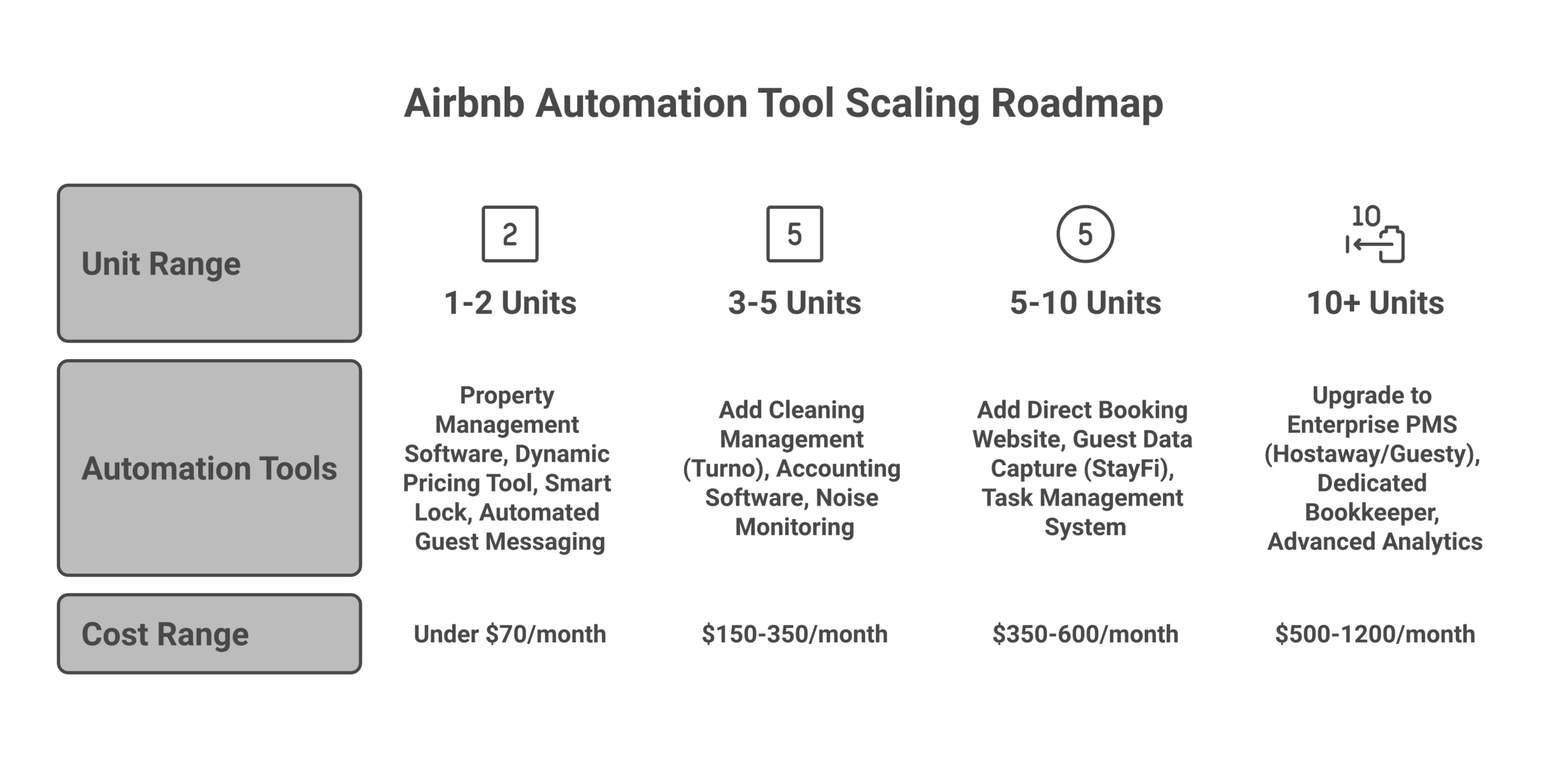
The Starter Stack (1-2 Units): Under $70/Month
| Tool | Purpose | Monthly Cost |
|---|---|---|
| Hospitable (Host plan) | PMS + guest messaging + channel manager | $40 |
| PriceLabs | Dynamic pricing | $20 |
| Turno (own cleaners) | Cleaning coordination | $0 |
| Smart lock (one-time) | Self check-in | $0 ongoing |
| Total | ~$60/mo |
This covers the essentials. You get automated guest messaging, dynamic pricing, cleaning scheduling, and self check-in. For 1-2 units, this handles 80% of the repetitive tasks that would otherwise consume your evenings and weekends.
The Growth Stack (3-9 Units): $150-$350/Month
| Tool | Purpose | Monthly Cost |
|---|---|---|
| Hospitable (Pro plan) | PMS + AI messaging + direct booking site | $40 + $30/extra property |
| PriceLabs | Dynamic pricing | $20/listing (volume discounts) |
| Turno | Cleaning coordination + marketplace | $0-$15 (commission-based) |
| Minut | Noise monitoring | $12/device |
| StayFi | Guest data capture for direct bookings | $10/property |
| Stessa | Financial tracking | $0-$12 |
| Total (5 units) | ~$280/mo |
The Scale Stack (10+ Units): $500-$1,200/Month
| Tool | Purpose | Monthly Cost |
|---|---|---|
| Hostaway or Guesty | Enterprise PMS + channel manager | $40/listing custom |
| PriceLabs | Dynamic pricing (portfolio discount) | $15-$20/listing |
| Breezeway | Task management + inspections | $8-$15/property |
| Turno | Cleaning coordination | $0-$20 |
| Minut | Noise monitoring per unit | $12/device |
| StayFi | Guest data capture | $10/property |
| QuickBooks | Full accounting | $15-$30 |
| Total (15 units) | ~$900/mo |
That $900/month sounds like a lot until you do the math. If your 15 units average $3,000/month each, you’re generating $45,000/month in gross revenue. $900 in automation tools is 2% of revenue. The alternative is hiring 1-2 full-time employees at $3,000-$4,000/month each, plus the management overhead of training and supervising them. Automation wins on cost every time.
When to Add Each Tool: The Scaling Roadmap
Timing matters. Add a tool too early and you’re bleeding subscription fees with minimal ROI. Add it too late and you’re already drowning in operational chaos. Here’s the sequence I recommend:
Day 1 (Before Your First Guest)
- Property management software – Non-negotiable. This is your operating system
- Dynamic pricing – Start with PriceLabs. Even one listing benefits from market-based pricing
- Smart lock – Install before your first booking. Self check-in eliminates the biggest logistical headache
- Automated guest messaging – Set up your 6-message sequence (covered above). Takes 45 minutes, saves 15-30 minutes per booking forever
Units 3-5 (The Operational Inflection Point)
- Cleaning management (Turno), When you’re coordinating 2+ cleaners, automation prevents scheduling conflicts
- Accounting software – Tax complexity increases rapidly with multiple properties. Get organized now
- Noise monitoring – One party complaint can end your arbitrage deal. Cheap insurance
Units 5-10 (Building the Machine)
- Direct booking website – OTA fees on 5+ units make this a clear ROI play
- Guest data capture (StayFi), Start building your email list for repeat bookings
- Task management – When you have a team (cleaners, handyman, co-host), you need a system
Units 10+ (Enterprise Mode)
- Upgrade PMS – Move to Hostaway or Guesty if your starter PMS is hitting limits
- Dedicated accounting – Consider a bookkeeper or full QuickBooks setup
- Advanced analytics – Market data tools, competitor monitoring, portfolio optimization
This scaling roadmap ensures you’re spending money on automation tools that deliver immediate ROI at each stage. The best cities for arbitrage have enough volume to justify the full stack by unit 5-7. In smaller markets, you might not need the complete setup until unit 10+.
Airbnb Automation Mistakes That Cost Real Money
I’ve made most of these mistakes myself. Save yourself the tuition:
Mistake 1: Over-Automating Guest Communication
Automated guest messaging handles routine tasks beautifully. But some hosts automate everything, including complaint responses, special requests, and emotional situations. A guest messages “The hot water isn’t working and my kids are freezing” and gets back a templated “Thanks for reaching out! We’ll look into this.” That’s how you get a 1-star review.
Rule: Automate the predictable. Handle the unpredictable personally. Your automation tools should flag urgent messages for human attention, not respond to them.
Mistake 2: Choosing Tools Based on Features Instead of Integrations
The best dynamic pricing tool in the world is useless if it doesn’t integrate with your PMS. Before buying any tool, verify that it connects to your existing property management system. Check the integration type too, native/API integrations are far more reliable than iCal sync, which can have delays of 15+ minutes.
Mistake 3: No Backup Systems
What happens when your smart lock batteries die? When your PMS has an outage? When your channel manager fails to sync and you get double bookings? Every automated system needs a manual fallback. Keep a lockbox with a physical key at each property. Have your cleaners’ phone numbers saved. Know how to manually block calendars across platforms.
Mistake 4: Ignoring the Data Your Tools Generate
Your dynamic pricing tools, PMS, and guest messaging platform generate enormous amounts of guest data, booking patterns, pricing trends, guest satisfaction signals, seasonal demand curves. Most hosts never look at this data. The ones who do find optimization opportunities worth thousands per year. Review your pricing tool’s market reports monthly. Read your guest reviews for patterns. Track your occupancy rate by day of week.
Frequently Asked Questions
What is the best all-in-one Airbnb automation tool?
Hospitable is the closest to an all-in-one for most arbitrage hosts. It combines property management software, automated guest messaging, a channel manager, task automation, and a direct booking website builder in a single platform starting at $40/month. For operations above 20 units, Hostaway offers a more enterprise-grade all-in-one solution.
How much do Airbnb automation tools cost per month?
A basic stack (PMS + dynamic pricing + smart lock) costs $60-$80/month for a single listing. A complete stack for 5 units runs $250-$350/month. For 10+ properties, expect $500-$1,200/month depending on which property management software and add-ons you choose. These costs typically represent 1-3% of gross revenue.
Can I automate Airbnb without a property management system?
Technically yes, but I don’t recommend it. Airbnb’s native tools handle basic automated messaging and pricing suggestions. But without a PMS, you can’t sync calendars across VRBO and Booking.com (risking double bookings), can’t integrate dynamic pricing tools properly, and can’t build automated workflows. A PMS is the foundation, everything else connects to it.
What’s the difference between Airbnb automation and a property management system?
A property management system is one category of Airbnb automation. “Airbnb automation” is the broader concept of using technology to handle routine tasks, pricing, messaging, cleaning scheduling, access control. A PMS is the central hub that connects these automation tools together. You can automate individual tasks without a PMS, but a PMS makes all your automation tools work as a coordinated system.
Do I need different tools for Airbnb vs. VRBO vs. Booking.com?
No. The whole point of a channel manager (built into most PMS platforms) is managing multiple listings across all platforms from a single dashboard. Your dynamic pricing tools, guest messaging, and cleaning management all operate through your PMS regardless of which booking platform the reservation came from.
How do smart locks work with Airbnb?
Smart locks integrate with your PMS via Wi-Fi. When a booking is confirmed, your property management software automatically generates a unique PIN code for that guest’s stay dates. The code is sent to the guest via automated guest messaging before check-in and expires at checkout. No physical keys, no lockboxes, no in-person handoffs.
What’s the ROI of Airbnb automation tools?
On a 5-unit portfolio averaging $3,500/month per unit, automation tools cost roughly $280/month and save 15-20 hours/week in manual work. Dynamic pricing alone typically increases revenue 10-20% ($1,750-$3,500/month across 5 units). The ROI is 5-10x the tool cost within the first month. The biggest return comes from dynamic pricing tools and the time savings from automated guest messaging.
How do I avoid double bookings across platforms?
Use a property management system with a built-in channel manager. Hospitable, Hostaway, and Guesty all sync calendars across Airbnb, VRBO, and Booking.com in near real-time (under 2 minutes). Never rely on iCal sync alone. It can have delays of 15+ minutes, which is enough time for overlapping bookings to slip through.
Build Your Automation Stack Today
You don’t need to buy everything at once. Start with the essentials, a solid property management system, dynamic pricing, a smart lock, and automated guest messaging. That four-tool foundation handles the heaviest lifting and costs under $70/month for your first listing.
As you add units, layer in cleaning management, noise monitoring, and a direct booking website. By unit 10, you want the full stack running so you can scale without your workload scaling alongside it.
The hosts who fail at arbitrage aren’t the ones who pick the wrong markets or set the wrong prices. They’re the ones who try to manage everything manually and burn out at unit three or four. Airbnb automation doesn’t replace you. It frees you to focus on the decisions that actually grow your vacation rental business: market selection, lease negotiation, and guest experience strategy.
Ready to get started? My complete rental arbitrage guide walks you through the entire process from finding your first deal to scaling your portfolio. And if you want to see the real numbers behind what hosts earn, check how much Airbnb hosts actually make.