
You can get more bookings on Airbnb by optimizing your listing title, using professional photography, enabling Instant Book, setting competitive prices with dynamic pricing tools, and building a review strategy that compounds over time. I’ve watched hosts go from 40% occupancy to 85%+ just by fixing these five elements, and in this guide I’ll walk you through each tactic step by step.
With over 8 million active Airbnb listings worldwide as of late 2025, standing out takes more than a clean space and a reasonable price. The hosts who consistently fill their calendars treat their listing like a business, not a side project. Whether you’re a new host with zero reviews or an experienced operator trying to push past 70% occupancy, the strategies below are proven to move the needle.
How the Airbnb Algorithm Decides Who Gets Booked
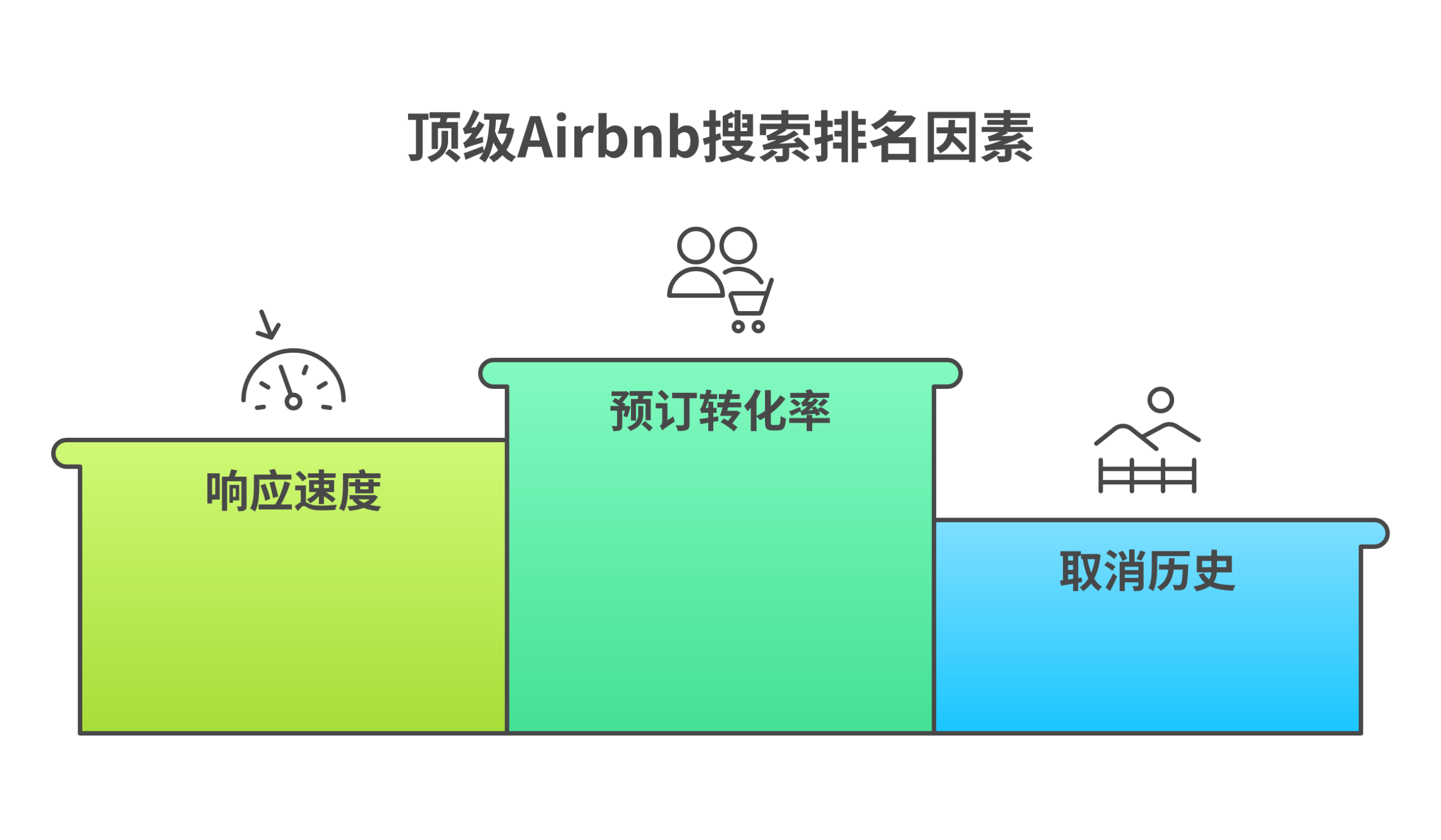
Before you can game the system, you need to understand it. Airbnb’s search ranking algorithm weighs several factors when deciding which listings appear first:
- Booking conversion rate: How often people who view your listing actually book. Higher conversion = higher placement.
- Response speed: Hosts who reply within an hour get priority. Airbnb tracks your response rate and response time separately.
- Cancellation history: Even one host cancellation can tank your ranking for months.
- Listing completeness: Every empty field is a missed signal. Fill out every single section.
- Guest satisfaction: Review scores, particularly your accuracy and cleanliness ratings, directly affect placement.
- Pricing competitiveness: Airbnb pushes listings priced within 5% of comparable properties in the same area.
I can’t stress this enough: the algorithm rewards momentum. Once you start getting bookings, your listing climbs. But the reverse is also true. A slow week pushes you down, which leads to fewer views, which leads to fewer bookings. That’s why the strategies below focus on building consistent booking velocity, not just one-time fixes.
Optimize Your Listing Title and Description for Search
Your listing title is the first thing potential guests see in Airbnb search results. Most hosts waste it with generic phrases like “Cozy Apartment Near Downtown.” That tells guests nothing specific.
A high-converting title follows this formula: [Unique Feature] + [Location Indicator] + [Guest Benefit]
Examples that work:
- “Rooftop Hot Tub | 5 Min Walk to Broadway | Free Parking”
- “Beachfront Studio | Ocean Views | King Bed + Fast WiFi”
- “Mountain A-Frame | Private Deck | 10 Min to Ski Lifts”
For your description, front-load the most important details. Guests skim. Put your top three selling points in the first two sentences. Then use short paragraphs to cover:
- The space itself (layout, beds, unique features)
- The neighborhood (what’s walkable, driving distances to attractions)
- What makes your place different from the 50 other listings nearby
Include keywords naturally. If you’re in Nashville, mention “Nashville” and surrounding neighborhoods multiple times. Airbnb’s search function matches guest queries to listing text.
Invest in Professional Photography (It Doubles Bookings)
According to Airbnb’s own data, listings with professional photography see bookings double compared to listings with phone snapshots. That’s not a marginal improvement. That’s 2x.
If you’re running rental arbitrage or managing multiple properties, professional photos are your single highest-ROI investment. Here’s what separates amateur from professional listing photos:
| Element | Amateur Photo | Professional Photo |
|---|---|---|
| Lighting | Overhead lights only, yellow cast | Natural light + flash bounce, white balance corrected |
| Angles | Standing in doorway, one angle | Corner shots that show full room depth |
| Staging | Lived-in clutter | Minimal, intentional props (flowers, open book, coffee cup) |
| Composition | Crooked, no focal point | Straight lines, clear subject hierarchy |
| Post-processing | None or heavy filter | Brightness/contrast adjusted, verticals corrected |
A professional photographer costs $150 to $400 per property. Given that a single extra booking at $150/night pays for the entire shoot, there’s no excuse to skip this. If budget is tight, at least learn the basics: shoot during golden hour, use a wide-angle lens (or phone lens attachment), and stage every room before you shoot.
Enable Instant Book (Non-Negotiable)
Instant Book lets guests reserve your property without waiting for you to approve the request. This matters for two reasons:
- Guests prefer it. Travelers browsing Airbnb filter for Instant Book listings. If yours isn’t enabled, you’re invisible to a large portion of searchers.
- The algorithm rewards it. Airbnb explicitly prioritizes Instant Book listings in search results because they lead to faster bookings, which is better for the platform.
Some hosts avoid Instant Book because they want to screen guests. I understand the concern, but here’s the reality: you can still set requirements. Require verified ID, positive reviews from previous stays, or that guests agree to your house rules before booking. You can also cancel penalty-free within 24 hours if something feels off.
Hosts who enable Instant Book typically see a 20-30% increase in booking inquiries within the first month. That’s not a guess. That’s what I’ve seen across dozens of properties.
Set Competitive Prices with Dynamic Pricing Tools
Static pricing is leaving money on the table during peak periods and scaring away guests during slow periods. If you charge $200/night year-round, you’re overpriced on Tuesdays in January and underpriced on Saturdays during festival season.
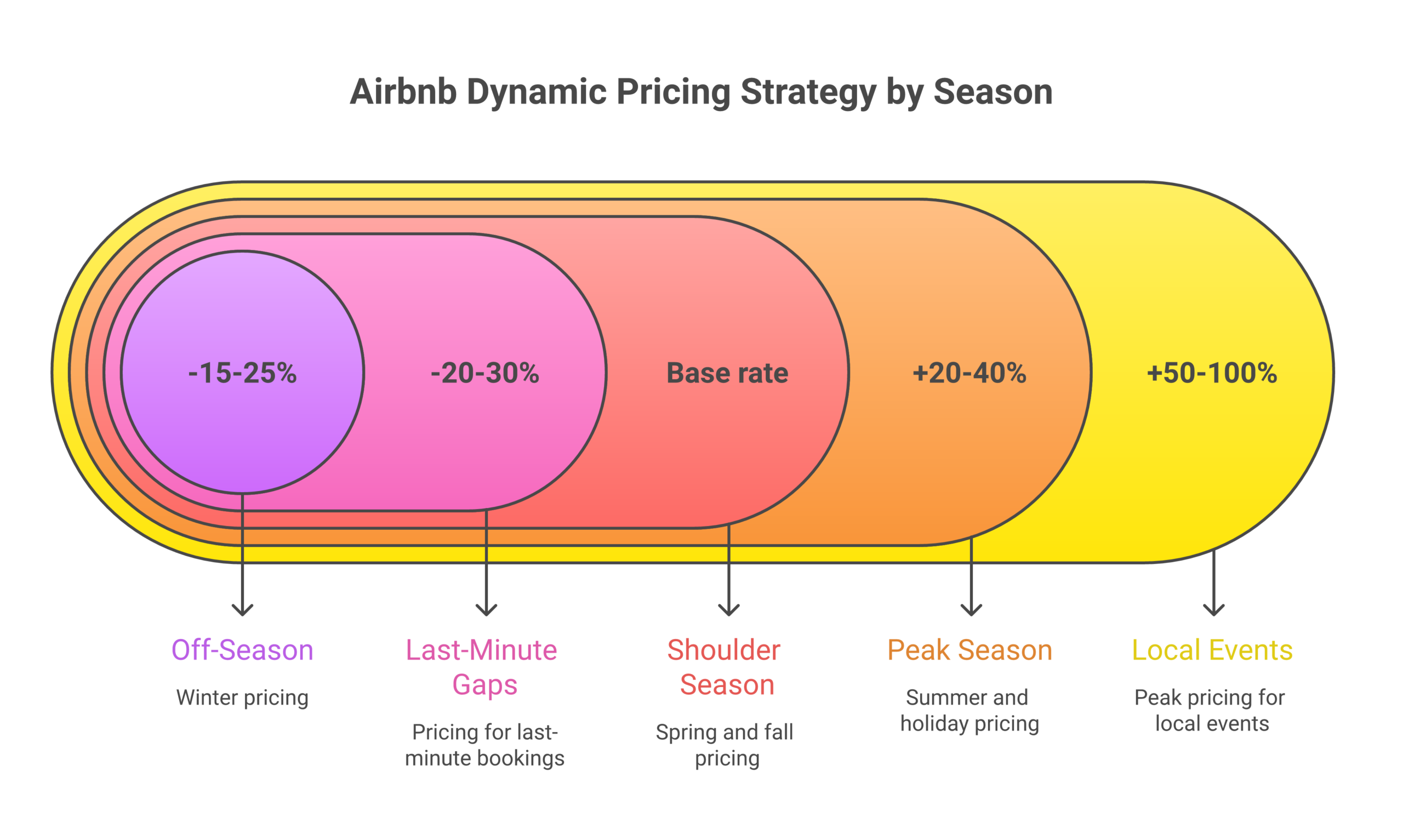
Dynamic pricing tools like PriceLabs, Beyond Pricing, and Wheelhouse analyze real-time market data (comparable listings, local events, seasonality, day of week) and adjust your nightly rate automatically. Here’s a simplified breakdown of how seasonal adjustments should look:
| Season | Pricing Adjustment | Minimum Stay |
|---|---|---|
| Peak season (summer, holidays) | +20-40% above base rate | 3-5 nights |
| Shoulder season (spring, fall) | Base rate | 2-3 nights |
| Off-season (winter, slow months) | -15-25% below base rate | 1-2 nights |
| Local events (concerts, sports, festivals) | +50-100% above base rate | 2-4 nights |
| Last-minute gaps (within 3 days) | -20-30% below base rate | 1 night |
Dynamic pricing tools cost $1-5 per listing per month. If they fill even one extra night per month, they’ve paid for themselves 10x over. I’ve seen hosts using PriceLabs or Beyond Pricing increase their annual revenue by 15-25% without changing anything else about their listing.
Build a Review Strategy That Compounds
Reviews are social proof. A listing with 50+ five-star reviews will outperform a listing with 5 reviews every single time, even if the properties are identical. Here’s the problem: guests don’t leave reviews automatically. Only about 50-70% of guests bother.
You need to actively encourage reviews without being pushy. What works:
- Send a checkout message: “Thanks for staying! If you enjoyed your visit, a review helps other travelers find our place. We’d really appreciate it.”
- Leave your review first: When you review a guest, Airbnb sends them a notification prompting them to review you back. Do this within 24 hours of checkout.
- Fix problems immediately: A guest who mentions a minor issue during their stay and sees you fix it the same day is far more likely to leave a glowing review than a guest who never said anything but was quietly annoyed.
Your target should be a 4.8+ overall rating. That’s the threshold Airbnb uses for Superhost status, which gives you a badge, priority search placement, and a 22% earnings bump according to Airbnb’s own statistics.
Master Guest Communication and Response Time
Airbnb tracks your response rate (percentage of messages you reply to) and response time (how fast you reply). To maintain search visibility, you need a 90%+ response rate and replies within one hour during active hours.
Here’s how to hit those numbers without being chained to your phone:
- Set up saved messages: Create templates for common questions (check-in instructions, WiFi password, local restaurant recommendations, parking details). One tap to send.
- Use a PMS (property management software): Tools like Hospitable, Guesty, or OwnerRez can auto-respond to new inquiries instantly, handle booking confirmations, and send check-in instructions on schedule.
- Turn on notifications: Obvious, but many hosts have Airbnb notifications buried. Make it priority.
Fast responses don’t just satisfy the algorithm. They close bookings. A guest comparing three listings will book the host who responds in 5 minutes over the host who responds in 5 hours, even if the second listing is slightly better.
List on Multiple Platforms (Don’t Put All Your Eggs in Airbnb)
Airbnb is the biggest short-term rental platform, but it’s not the only one. Listing on Vrbo, Booking.com, and your own direct booking website expands your reach to guests who don’t use Airbnb.
Here’s the breakdown by platform:
- Vrbo: Skews toward families and larger groups. Whole-home listings perform well here. Less competitive than Airbnb in most markets.
- Booking.com: Massive international traffic. If your property is in a tourist city, you’ll get bookings from European and Asian travelers who default to Booking.com.
- Direct booking site: Eliminates platform fees (3-15%), builds your brand, and gives you guest email addresses for repeat marketing. Takes more effort to build, but the margins are much better long-term.
Use a channel manager to sync calendars across platforms. Double bookings are the fastest way to kill your reputation on any platform.
Fill Your Calendar Gaps with Smart Minimum Stay Settings
Rigid minimum stay requirements create orphan nights. Those are single nights that sit empty between bookings because your minimum is too high for anyone to fill them.
Example: You have a 3-night minimum. Guest A checks out Monday. Guest B checks in Thursday. Tuesday and Wednesday sit empty because no one can book a 3-night stay in a 2-night gap.
The fix: Use gap-filling settings. Most dynamic pricing tools and PMS platforms let you automatically drop your minimum stay when there’s a gap of 1-2 nights between bookings. You can also reduce the nightly rate for these orphan nights since even a discounted booking beats an empty calendar.
Hosts who implement gap-filling strategies consistently see 5-15% higher occupancy rates. On a $200/night property, that’s an extra $3,000-$9,000 per year in revenue that was previously going to waste.
Offer Unique Amenities That Get You Bookmarked
Every listing has WiFi, a coffee maker, and clean towels. Those are table stakes. The amenities that actually drive bookings are the ones guests can’t get at a hotel or most other Airbnbs:
- Hot tub or pool: The single most-searched amenity filter on Airbnb. Properties with hot tubs charge 15-30% more per night.
- Game room: Arcade machines, foosball, board game collections. Families and groups love this.
- Outdoor fire pit: Low cost to install ($200-$500), but adds major perceived value for mountain, lake, or rural properties.
- EV charger: Growing fast. Tesla owners specifically filter for this. Installation costs $500-$2,000 but attracts a higher-income guest demographic.
- Dedicated workspace: Monitor, ergonomic chair, fast WiFi. Remote workers book longer stays. This single amenity can shift your average stay from 2 nights to 5+.
Check your competitors’ listings in your market. Whatever amenities they don’t offer are your opportunity to stand out. You don’t need all of these. You need one or two that make guests say, “That’s the one.”
Keep Your Calendar Updated (Seriously)
An outdated calendar kills your Airbnb search ranking faster than almost anything else. When guests request dates that are actually unavailable, they get declined or the booking gets cancelled. Both outcomes damage your algorithm placement.
Rules for calendar management:
- Block unavailable dates immediately. Don’t wait until “later.”
- If you list on multiple platforms, use a channel manager to sync automatically. Manual syncing will eventually fail.
- Open your calendar at least 6 months out. Guests planning trips 3-6 months ahead won’t see your listing if it only shows 30 days of availability.
- Accept or decline booking requests within 24 hours. Letting requests expire counts against your response rate.
Get Bookings When You Have Zero Reviews (New Host Strategy)
Starting from scratch is the hardest part. No reviews means guests take a risk booking with you, so you need to offset that risk. Here’s the playbook:
- Price 15-20% below market for your first 5 bookings. You’re buying reviews. It’s the fastest way to build social proof, and once you have 10+ reviews, you raise your rates.
- Enable Instant Book immediately. New hosts without reviews can’t afford the extra friction of requiring approval.
- Complete your host profile. Add a real photo (not a logo), write a personal bio, verify your identity. Guests booking with a zero-review host want to know you’re a real person.
- Offer a launch discount: Airbnb has a “new listing” promotion feature that gives you a discount badge. Use it.
- Ask friends and family to be your first guests. They book, stay, and leave honest reviews. It’s not against Airbnb’s terms as long as they actually stay and pay.
Most new hosts reach 10+ reviews within 60-90 days using this approach. After that, the algorithm starts treating you like any other listing and your booking rate normalizes.
Use Social Media to Drive Off-Platform Demand
Most of your bookings will come from Airbnb search, but supplementing with social media can fill gaps during slow periods and reduce your dependence on the platform.
The platforms that work best for vacation rentals:
- Instagram: Post property photos, guest testimonials (with permission), local area highlights. Use location tags and relevant hashtags (#airbnb, #vacationrental, #[yourcity]travel).
- TikTok: Short property tours perform surprisingly well. A 30-second walkthrough video can generate thousands of views and direct traffic to your listing.
- Pinterest: Travel planning boards drive long-tail traffic. Pin your listing photos with descriptive titles like “Beachfront Airbnb in Myrtle Beach with Private Pool.”
- Facebook Groups: Join local travel and tourism groups. When someone asks for accommodation recommendations, you’re there with a helpful response (not a spammy promotion).
You don’t need to be on every platform. Pick the one where your ideal guest spends time and commit to posting 3-4 times per week for 90 days. Then measure whether it moved the needle.
Track Your Performance with Airbnb Analytics
Airbnb provides host analytics showing your views, conversion rate, occupancy rate, and earnings over time. Most hosts never look at this data. That’s a mistake.
Key metrics to track monthly:
| Metric | Target Benchmark | What It Tells You |
|---|---|---|
| Views | Trending up month-over-month | Is Airbnb showing your listing to people? |
| Conversion rate (views to bookings) | 2-5% is healthy | Are people who see your listing booking it? |
| Occupancy rate | 70-85% depending on market | How full is your calendar? |
| Average nightly rate | Within 10% of top comps | Are you priced right for your market? |
| Review score | 4.8+ overall | Are guests satisfied? |
| Response rate | 95%+ | Are you fast enough for the algorithm? |
If views are high but bookings are low, your listing needs work (photos, description, pricing). If views are low, your search ranking needs help (calendar, Instant Book, reviews). The data tells you exactly where to focus.
Consider Co-Hosting or Property Management to Scale
If you’re managing multiple properties and struggling to keep occupancy high across all of them, co-hosting might be the answer. A co-host handles the day-to-day (guest communication, cleaning coordination, restocking) while you focus on strategy and growth.
Co-hosts typically charge 10-25% of booking revenue, but good ones pay for themselves by maintaining faster response times, higher review scores, and fewer cancelled bookings than you can manage alone at scale.
Alternatively, if you want to build a rental portfolio without the management headaches, the rental arbitrage model lets you lease properties and list them on Airbnb. 10XBNB students use this approach to build portfolios of 5, 10, even 20+ properties with no real estate purchases required. Learn how 10XBNB students build rental portfolios that generate $5,000-$10,000+ per month in profit.
Why Your Airbnb Isn’t Getting Booked (Common Mistakes)
If you’ve tried everything above and your calendar is still empty, one of these issues is likely the culprit:
- Your photos are bad. This is the number one reason listings underperform. If you skipped the photography section above, go back and read it.
- Your price is too high for your market. Search for similar listings in your area and compare. If you’re 20% above comparable properties, guests will book them instead.
- Your response time is slow. Airbnb penalizes hosts who take more than 24 hours to respond. Get a PMS or set phone alerts.
- You have too many cancellations. Even one host-initiated cancellation hurts your ranking. Plan ahead.
- Your listing is incomplete. Empty amenity checkboxes, missing house rules, no neighborhood guide. Fill every field.
- You don’t have Instant Book enabled. Turn it on today.
- Your minimum stay is too restrictive. Try dropping to 1-2 nights for a month and see what happens to your occupancy.
Run through this checklist honestly. The fix is usually one or two of these items, not a fundamental problem with your property or market.
Related guides: Airbnb automation tools, co-host training program.
Frequently Asked Questions
How long does it take to start getting bookings on Airbnb?
New listings typically receive their first booking within 1-3 weeks if priced competitively and optimized with professional photos. Airbnb gives new listings a temporary search boost (called the “new listing boost”) for the first few weeks, so it’s critical to have everything polished before you go live. Most hosts reach consistent booking flow within 60-90 days.
What occupancy rate should I aim for on Airbnb?
A healthy occupancy rate for most Airbnb markets is 70-85%. Below 60% usually signals a pricing or listing quality issue. Above 90% might mean you’re priced too low. The sweet spot depends on your market and whether you’re optimizing for revenue or occupancy. Generally, a 75% occupancy rate at the right nightly rate generates the highest total revenue.
Does Airbnb Superhost status actually increase bookings?
Yes. Airbnb reports that Superhosts earn 22% more than regular hosts. The Superhost badge appears in search results and on your listing, acting as instant social proof. Requirements include a 4.8+ rating, 90%+ response rate, fewer than 1% cancellations, and at least 10 completed trips per year.
Should I lower my price to get more Airbnb bookings?
Lowering your price works as a short-term tactic, especially for new listings building reviews. But long-term, you should compete on value rather than price. Professional photos, unique amenities, and strong reviews allow you to charge premium rates while maintaining high occupancy. Dynamic pricing tools handle the day-to-day adjustments so you’re never overpriced or underpriced.
How do I get more bookings on Airbnb during the off-season?
Drop your minimum stay to 1 night, lower your nightly rate by 15-25%, target business travelers and remote workers (offer fast WiFi and a dedicated workspace), and market your area’s off-season attractions. Many hosts also offer weekly and monthly discounts during slow periods. A filled calendar at a lower rate beats an empty calendar at a high rate.
Is rental arbitrage a good way to scale Airbnb bookings?
Rental arbitrage is how many full-time Airbnb operators build portfolios of 5-20+ properties without buying real estate. You lease a property, furnish it, and list it on Airbnb. The profit margin depends on your market, but successful arbitrage operators typically net $1,000-$3,000+ per property per month. The key is choosing the right market and running the numbers before signing a lease. Read about the pros and cons of rental arbitrage before deciding if it’s right for you.