
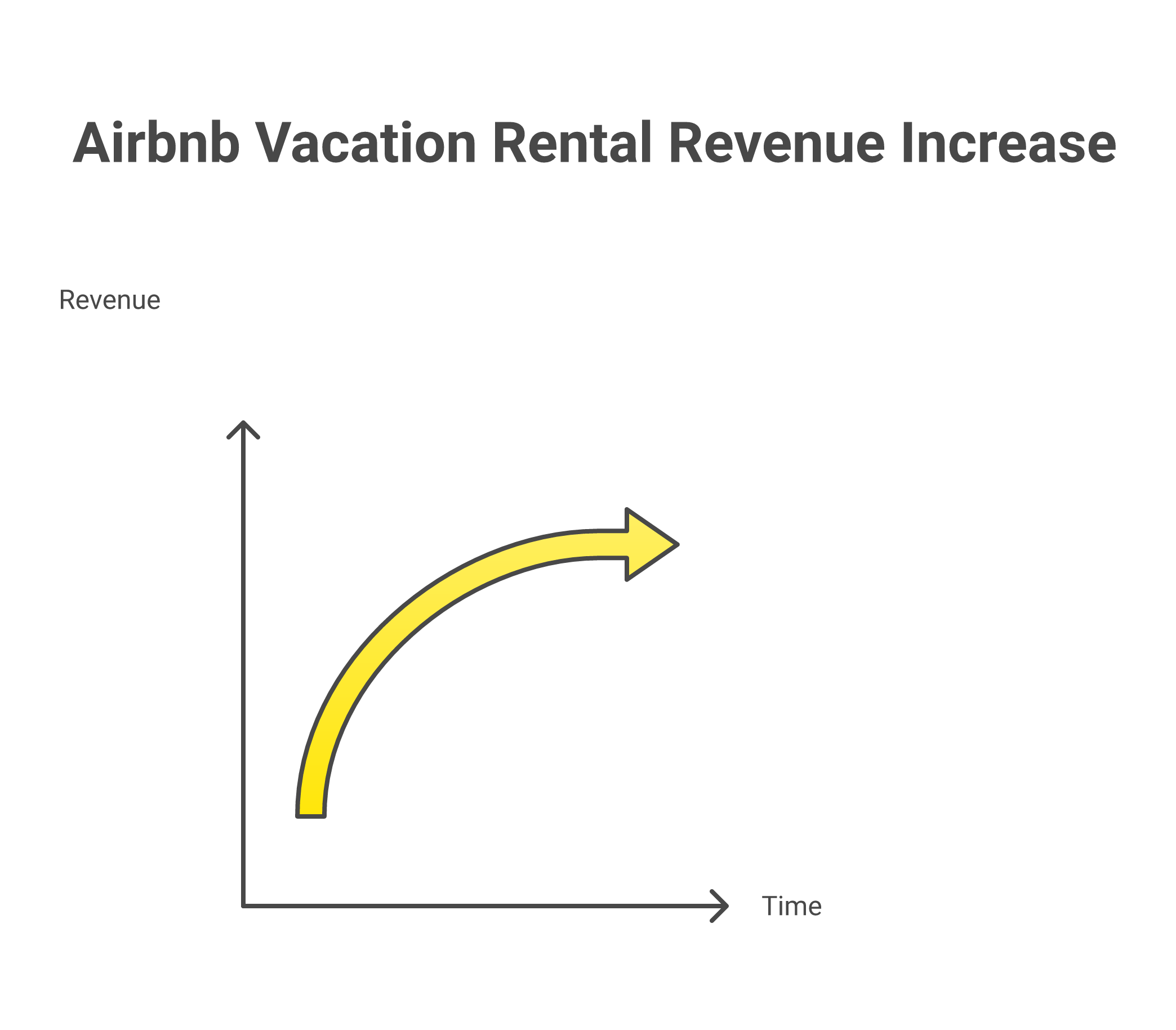
I manage 24 Airbnb listings and every single one of them runs on dynamic pricing tools. Not because I’m lazy about setting my nightly rates manually – though that’s part of it – but because I ran a 90-day test across my portfolio where half my properties used PriceLabs pricing and the other half used manual pricing that I set myself. The PriceLabs properties earned 22% more revenue over those 90 days. Same properties, same markets, same guests. The only difference was letting a pricing tool make the pricing decisions instead of me guessing.
That 22% pricing difference across 24 vacation rental and short term rentals properties adds up to a lot of money. And it’s why I tell every host and every student inside 10XBNB: dynamic pricing tools are not optional. They’re the single most impactful tool you can use and add to your Airbnb business for boosting revenue and maximizing your nightly rates.
In this guide I’m going to break down the best airbnb pricing tools and the best airbnb airbnb pricing tools and dynamic pricing tools available this year in 2026, compare them honestly based on my experience using each one across real vacation rental and short term rentals properties, and tell you exactly which pricing tool I recommend you use depending on your situation. I’ll cover pricing, features, the level of customization each tool gives you, and what kind of hosts each pricing tool works best for.
Why Every Airbnb Host Needs Dynamic Pricing Tools
Dynamic pricing means your nightly rates adjust automatically based on supply and demand in your local market. Instead of setting one flat rate for your vacation rentals listing and hoping for the best, dynamic pricing tools analyze data from thousands of comparable listings and set your rates to maximize both occupancy and revenue every single day of the year.
Here’s why that matters for users and hosts: a Friday night in July in a beach town should have completely different pricing than a Tuesday in February. But it goes deeper than just seasonal pricing adjustments. Dynamic pricing tools factor in local events, competitor rates, day of week patterns, how far out the booking is, your listing’s review score, and dozens of other data points that no host could track manually across multiple properties.
A 2025 study by Your.Rentals across 541 vacation rentals listings in 34 countries found that hosts using dynamic pricing tools earned 36% more revenue on average compared to hosts using static pricing. That’s not a small difference. On a property grossing $5,000 a month, dynamic pricing tools add an extra $1,800 in revenue over time every month. That’s $21,600 a year in additional revenue from a tool that costs $20 a month. The pricing math is honestly ridiculous once you see it.
And here’s the thing most hosts don’t realize: Airbnb pricing and search algorithm factors in your pricing when deciding where to show your listing in search results. Properties with dynamic pricing that matches current market demand get better placement than properties with stale flat rates that are either too high (killing bookings) or too low (leaving money on the table). Using dynamic pricing tools doesn’t just set better rates – it actually helps your listing rank higher in Airbnb search so more guests see your property.
The Best Dynamic Pricing Tools for Airbnb and Vacation Rental Hosts this year in 2026
I’ve tested five pricing tools across my properties over time in the past several years: PriceLabs, Beyond Pricing, Wheelhouse, DPGO, and Airbnb’s built-in Smart Pricing. Here’s the honest comparison based on real pricing data from real vacation rental and short term rentals properties.
PriceLabs: The Best Airbnb Dynamic Pricing Tool for Serious Hosts
PriceLabs is the dynamic pricing tool I use across all 24 of my vacation rentals listings and it’s the pricing tool I recommend to most hosts in the 10XBNB program. Here’s why.
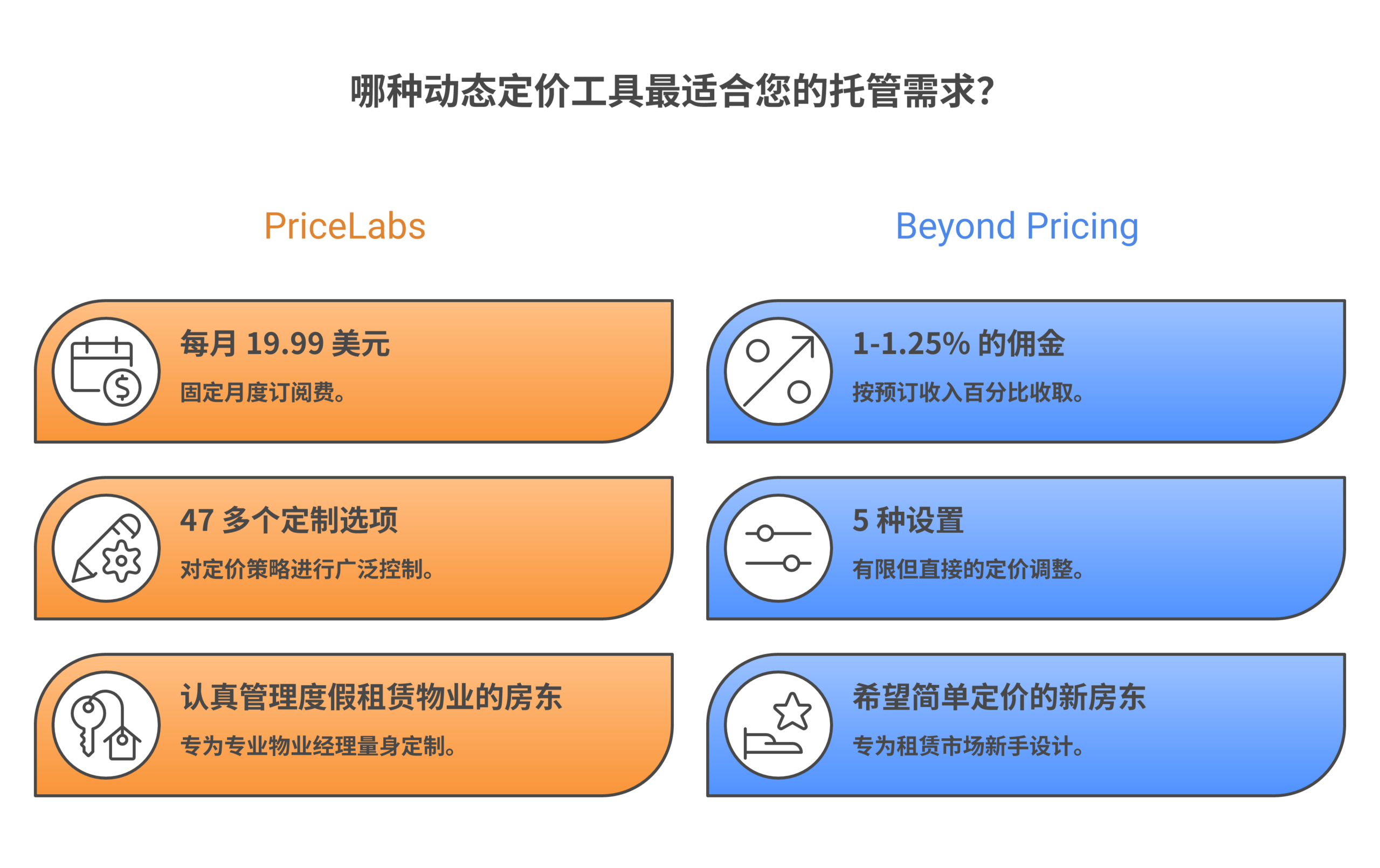
PriceLabs gives you full control over your pricing with customization options that no other airbnb pricing tools or dynamic pricing tool matches. We’re talking about 47+ different pricing settings you can adjust: minimum and maximum rates for every single day of the week, base price adjustments by season, orphan day pricing (filling those single empty nights between bookings), length-of-stay pricing discounts, last-minute pricing adjustments, far-out pricing premiums, event-based pricing overrides, and a lot more. If you want granular control over how your vacation rental rates are set, PriceLabs is the pricing tool that gives you the most customization options.
The PriceLabs pricing algorithm pulls market data from over 10 million listings across Airbnb, VRBO, and Booking.com. It analyzes comparable vacation rentals listings in your area, seasonal demand patterns, local events, day-of-week pricing trends, and booking lead time to recommend optimal nightly rates for every single day on your calendar. The pricing recommendations update daily so your rates are always current with market demand.
PriceLabs pricing: $19.99 per month this year per listing. That’s flat rate pricing regardless of how much revenue your property generates. For hosts managing 5+ vacation rental properties, they offer portfolio pricing discounts that bring the per-listing cost down further.
The downside of PriceLabs? The user interface isn’t going to win any design awards. There’s a learning curve for new users. Most hosts in our program spend about 2 hours getting comfortable with the PriceLabs pricing settings and customization options. But once your base price, minimum and maximum rates, and seasonal pricing adjustments are set up, the software tool runs on autopilot with maybe 15 to 20 minutes of pricing tweaks time per week.
Best for: hosts and vacation rental operators with 3+ properties who want maximum control over their pricing strategy and customization options for every aspect of their dynamic pricing.
Beyond Pricing: Set It and Forget It Dynamic Pricing for Airbnb Hosts
Beyond Pricing is the opposite of PriceLabs in terms of complexity. Where PriceLabs gives users 47 pricing customization options, Beyond gives users about 5. And for a lot of vacation rentals hosts, that simplicity is actually the point.
The Beyond Pricing setup takes about 10 minutes. Users connect and integrate their Airbnb account, set their minimum and maximum rates for the listing, and the pricing algorithm handles everything else. Beyond was one of the first dynamic pricing tools for vacation rentals hosts – they’ve been around since 2013 – and they’ve processed over $35 billion in booking revenue through their pricing platform. That’s a massive data set powering their pricing decisions.
The catch with Beyond Pricing: they charge a commission on your booking revenue – typically 1% to 1.25%. On a vacation rentals property grossing $5,000 a month, that makes it $50 to $62.50 in pricing tool fees. Compare that to PriceLabs at $19.99 flat per month this year and you’re paying 2.5 to 3 times more for less control over your pricing. At 10 properties grossing $50,000 monthly, Beyond Pricing costs $500 to $625 per month versus $200 for PriceLabs. That commission pricing model adds up fast as hosts scale their vacation rental portfolio.
Best for: new Airbnb hosts with 1 to 3 vacation rentals listings who want zero complexity in their pricing and are okay with commission-based pricing rather than flat rate pricing.
Wheelhouse: The Best Free Dynamic Pricing Tool for Vacation Rental Hosts
Wheelhouse sits between PriceLabs and Beyond Pricing in terms of customization options and ease of use. The pricing tool’s interface is clean and the setup is straightforward without being too stripped down for serious hosts.
What makes Wheelhouse different from other pricing tools is that users choose a pricing strategy before the algorithm starts setting rates. You pick conservative, balanced, or aggressive pricing and the dynamic pricing system calibrates all your rates accordingly. Conservative pricing prioritizes occupancy over nightly rates. Aggressive pricing prioritizes higher rates over occupancy. Balanced pricing does what you’d expect. For most new users and hosts I recommend starting on balanced pricing and adjusting after you have 30 to 60 days of booking data from your vacation rentals listings.
Wheelhouse users report an average 40% boost in revenue after use and implementing dynamic pricing through their website. The pricing tool has integration with major property management systems and channel managers with full integration so your rates sync across Airbnb, VRBO, and direct booking integration website platforms automatically.
Wheelhouse pricing: they offer a free tier that includes basic market pricing data and manual pricing recommendations. The paid tier starts at $19.99 per listing per month for full dynamic pricing automation. The free tier is actually useful for users and hosts who want to understand what dynamic pricing looks like before committing money to a pricing tool subscription.
Best for: vacation rentals hosts who want a balance of pricing control and simplicity, or anyone wanting to test dynamic pricing tools for free before paying.
DPGO: The AI-First Dynamic Pricing Tool
DPGO positions itself as the most AI-driven dynamic pricing tool on the market and website for vacation rental hosts. Their pitch is that their pricing algorithm uses machine learning that continuously improves as it processes more booking data from users’ specific listings and markets over time periods.
DPGO pricing: $18 per month per listing or $1 per booked night – whichever is less. That pricing model is actually smart for users and hosts because you’re not paying for empty nights when your listing isn’t generating bookings.
I tested DPGO’s pricing on 3 of my vacation rental properties for about 4 months. The pricing results were decent – maybe 5 to 10% below what PriceLabs pricing was generating on comparable properties – but the AI pricing optimization did seem to improve over time. By month 3 the revenue gap between DPGO pricing and PriceLabs pricing was closing. The issue for my use case was that with 24 properties I need a pricing tool that performs at the top from day one without wasting time. I can’t afford to wait 3 months for a pricing algorithm to learn my market dynamics when PriceLabs pricing already knows them.
Best for: budget-conscious vacation rental hosts willing to let the AI pricing tool learn their market over time. Good pricing option for new users and hosts at $18 per month over time.
Airbnb pricing tool called Smart Pricing: Why I Don’t Recommend This Pricing Tool
Airbnb has its own built-in pricing tool called Smart Pricing. It’s free. It’s automatic. And in my experience using it across multiple vacation rentals listings, Smart Pricing consistently underprices your property compared to third-party airbnb pricing tools.
Here’s why: Airbnb pricing incentive as a platform is to fill properties and maximize the total number of bookings. Your incentive as a host is to maximize revenue per night and total profit. Those aren’t the same pricing goals. Airbnb Smart Pricing would rather your listing books at $120 a night and sits fully occupied than books at $180 a night with 2 empty nights time per week. But depending on your cost structure as a vacation rental host, those 2 empty nights at $180 pricing might actually make you more money than full occupancy at $120 pricing.
Airbnb Smart Pricing doesn’t understand your costs. It doesn’t know your rent, your cleaning fees, your utilities, or your break-even rates. The pricing tool just wants bookings on the Airbnb website pricing platform. Every experienced host I know who uses dynamic pricing tools has turned Smart Pricing off and switched to PriceLabs, Wheelhouse, or Beyond Pricing instead.
Head-to-Head Comparison: Airbnb Dynamic Pricing Tools Feature Matrix
| Pricing Tool | Monthly Pricing | Best For | Control Level | Customization Options | Ease of Setup | My Rating |
|---|---|---|---|---|---|---|
| PriceLabs | $19.99 per listing | Serious hosts with 3+ vacation rental properties | Very High | 47+ pricing settings | Medium – 2 hour learning curve | 9/10 |
| Beyond Pricing | 1 to 1.25% of revenue | New hosts wanting zero pricing complexity | Low | 5 basic pricing settings | Very Easy – 10 min setup | 7/10 |
| Wheelhouse | Free tier or $19.99 per listing | Hosts wanting balanced pricing control | Medium | Strategy-based customization options | Easy | 8/10 |
| DPGO | $18 per listing or $1 per booked night | Budget-conscious vacation rental hosts | Medium-High | AI-driven pricing customization | Medium | 7/10 |
| Airbnb Smart Pricing | Free | Not recommended for serious hosts | Very Low | Minimum and maximum rates only | Already built in | 3/10 |
How to Set Your Base Price and Minimum and Maximum Rates
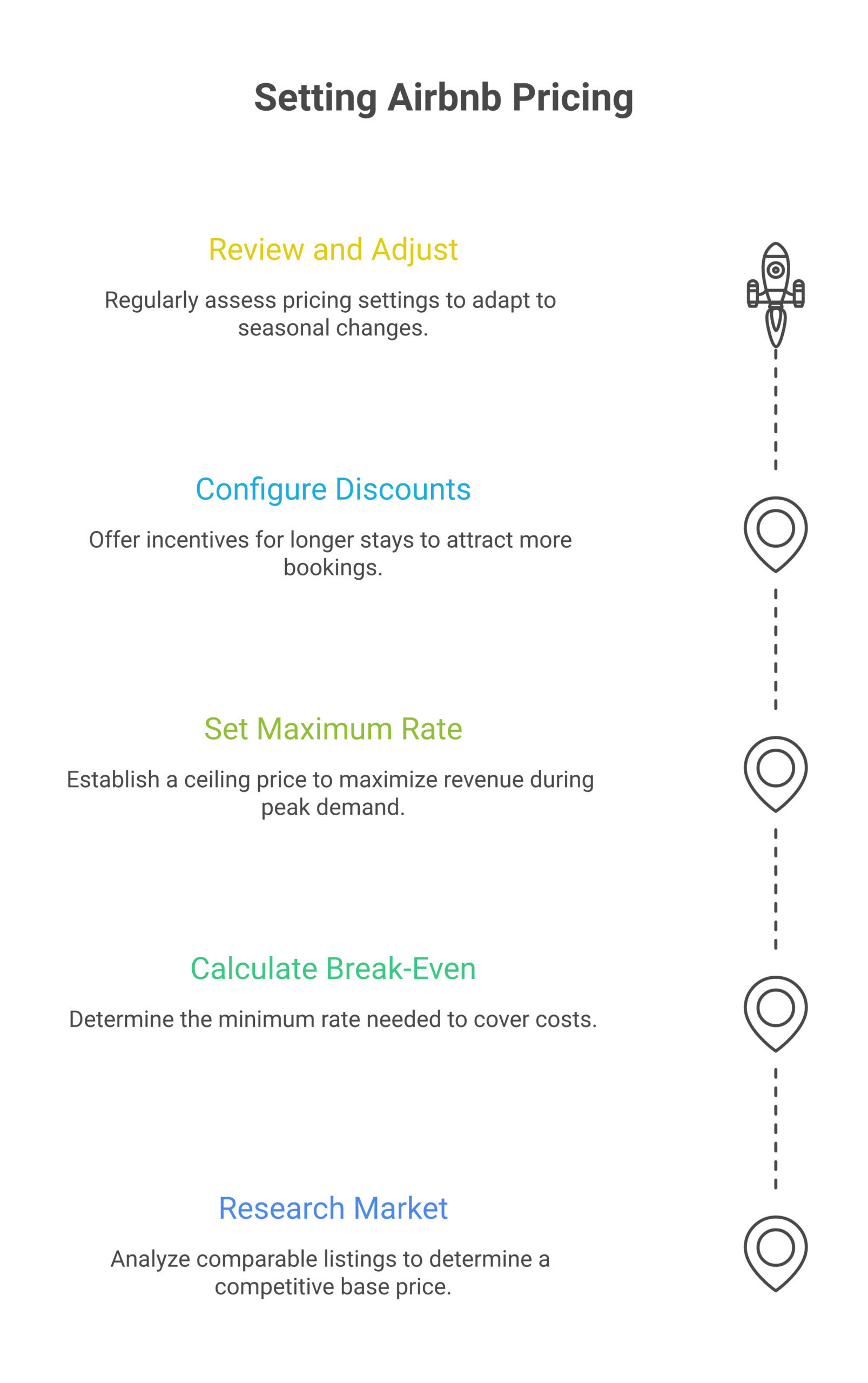
No matter which dynamic pricing tool you choose, you need to set three critical pricing numbers correctly or the tool won’t work well for your vacation rentals listings:
Base price: This is your starting nightly rate that the dynamic pricing algorithm adjusts up or down based on market demand. Set your base price by looking at comparable vacation rental listings in your area on Airbnb – properties with similar size, amenities, location, and guest capacity. Your base price should be right in the middle of what comparable listings charge. The pricing tool adjusts from there based on demand.
Minimum rates: The lowest nightly rate you’re willing to accept for your listing. This is your floor pricing – the dynamic pricing tool will never set your rates below this minimum no matter how low demand gets. Calculate your minimum rate by adding up your monthly costs (rent, cleaning per turnover, utilities, insurance, supplies, platform fees) and dividing by the number of nights in a month. Your minimum rate should be at least 10 to 15% above your break-even pricing per night so you’re always generating some profit even in the slowest month of the year.
Maximum rates: The highest nightly rate the dynamic pricing tool can set for your listing. Maximum rates matter during peak demand periods – holidays, local events, high season weekends. Set your maximum rates aggressively because you don’t want the pricing tool to cap your nightly rates when demand is at its highest. I set my maximum rates at 3x my base price which gives the dynamic pricing algorithm room to capture maximum revenue during peak demand.
Length-of-Stay Pricing Discounts: The Strategy Most Hosts Miss
This is one of the highest-impact pricing strategies you can use and implement and most vacation rental hosts don’t take advantage of it properly. When a guest books 7 nights instead of 2, your cleaning costs using your software stay the same – one turnover instead of three or four. But your revenue is 3.5 times higher. So offering a length-of-stay pricing discount actually increases your profit margins even though your nightly rates are lower.
Here’s the discount pricing structure I use across my vacation rental properties and recommend to hosts in the 10XBNB program:
| Stay Length | Pricing Discount | Why This Pricing Works |
|---|---|---|
| 3 to 6 nights | 5% off nightly rates | Small pricing incentive to extend a weekend trip |
| 7 to 13 nights | 12% off nightly rates | Attracts weekly guests and remote workers at discounted pricing |
| 14 to 27 nights | 18% off nightly rates | Appeals to relocating guests and project workers with mid-term pricing |
| 28+ nights | 25 to 30% off nightly rates | Mid-term rental pricing with very low turnover costs |
That 28-night discount pricing might look steep but do the math. A vacation rentals property at $200 per night with 65% occupancy generates about $3,900 per month with 8 to 10 turnovers. That same property at $150 per night pricing (25% discount) booked solid for 30 nights generates $4,500 with one single turnover. More revenue, less work, lower cleaning costs. The pricing math is clear once you set it up in your dynamic pricing tool.
Seasonal Pricing Strategies for Vacation Rental Hosts
Every market has a high season and a low season. The pricing mistake I see hosts make constantly is not adjusting their rates aggressively enough in either direction with their dynamic pricing tools.
During peak season: raise your rates more than you think you should. If every comparable vacation rental listing in your market is booked and yours isn’t, your pricing isn’t too high – you’re priced right and you’ll book anyway. But if you’re one of the first listings to book during peak season, your pricing was probably too low and you left $30 to $50 per night on the table. Dynamic pricing tools handle seasonal pricing adjustments automatically but you need to set your seasonal pricing parameters correctly or the algorithm won’t push rates high enough during peak demand.
During slow season: drop your minimum rates and offer bigger length-of-stay pricing discounts. An occupied vacation rental at a lower rate beats an empty property at full pricing every single time. PriceLabs and Wheelhouse handle seasonal pricing adjustments well but you need to verify that your minimum and maximum rates are set correctly for each season or the dynamic pricing tool won’t adjust aggressively enough to compete in your market.
For my vacation rental properties in Vancouver, summer rates run 40 to 60% above winter pricing. In ski markets like Whistler the opposite is true – winter is the peak revenue season. Know your market’s seasonal pricing patterns and make sure your dynamic pricing tool is configured to match those demand cycles.
The Full Pricing and Revenue Management Tech Stack for Vacation Rental Hosts
A dynamic pricing tool is the foundation of your revenue management strategy but it’s not the only tool you need for running profitable vacation rental listings. Here’s the full tech stack I run across all 24 of my Airbnb properties:
Dynamic pricing tool (PriceLabs): $19.99 per listing per month over time. Sets optimal nightly rates based on market demand data. The core pricing tool that drives revenue.
Property management system: If you’re managing 5+ vacation rental listings across multiple platforms, a PMS software like Guesty or Hostaway has integration that syncs your calendars, booking data, and guest communications. Integration with your dynamic pricing tool so rate changes propagate automatically to Airbnb, VRBO, and direct booking websites. $30 to $100+ per month depending on portfolio size.
Smart locks: August or Yale for keyless guest check-in at each vacation rental property. About $200 to $300 per lock. Essential for remote property management and eliminates the need for in-person key handoffs.
Automated messaging software tools: Hospitable or Airbnb’s built-in scheduled messages for guest communication at every stage – booking confirmation, pre-arrival, check-in, mid-stay check-in, checkout, and review request. Saves hours of time every week for hosts managing multiple vacation rental listings.
Total monthly pricing for the full stack runs about $50 to $100 per property depending on which tools you use. That’s a tiny fraction of what a well-optimized vacation rental listing generates in revenue each month with proper dynamic pricing.
Getting Started with Dynamic Pricing Tools: My Recommendation for New Hosts
If I was starting my first co-listing or rental arbitrage property today with a limited budget, here’s exactly what I’d do with pricing tools:
Month 1: Use the Wheelhouse free tier to understand your market’s pricing patterns and demand cycles. Study the pricing data for 2 weeks. Learn what drives rates up and down in your specific vacation rental market.
Month 2 to 3: Switch to PriceLabs at $19.99 a month. Set conservative minimum rates at first – I’d rather book at a slightly lower rate than sit empty while I’m still getting guest reviews and building my listing’s reputation on the website platform. Once you have 10 to 15 five-star reviews, start pushing your pricing rates up.
Month 4 and beyond: Get aggressive with PriceLabs pricing customization options. Set orphan day pricing so single empty nights between bookings get filled at discounted rates. Create weekend and holiday pricing premiums. Set length-of-stay pricing discounts to attract 3 to 7 night bookings which are the sweet spot for vacation rental hosts – longer stays mean fewer turnovers and lower cleaning costs which boost your profit margins.
For 10XBNB co-host training students I walk through the exact PriceLabs pricing setup in our weekly coaching calls because getting the pricing settings and customization options right for your specific market makes a massive difference to your vacation rental revenue. A pricing tool is only as good as how hosts configure it.
For more on how pricing fits into your overall Airbnb business, check our rental arbitrage guide, the co-host training program, our Airbnb courses comparison, and the startup costs breakdown. If you want to calculate your potential revenue before choosing a pricing tool, use our arbitrage calculator.
Frequently Asked Questions About Airbnb Dynamic Pricing Tools
Is Airbnb Smart Pricing worth using?
No. In my experience as a host managing 24 vacation rental listings, Airbnb Smart Pricing consistently underprices properties compared to third-party dynamic pricing tools. Airbnb’s pricing incentive is to maximize bookings, not to maximize your revenue. Use PriceLabs, Wheelhouse, or Beyond Pricing instead.
Which dynamic pricing tool is the best for beginner vacation rental hosts?
If you want zero pricing complexity, Beyond Pricing – it sets your rates with minimal input. If you want a free starting point, Wheelhouse’s free tier gives you market pricing data and manual pricing recommendations. If you’re willing to invest an hour learning the interface, PriceLabs gives you the best pricing value and the most customization options from day one.
How much do dynamic pricing tools boost revenue for Airbnb hosts?
Data shows 15 to 36% revenue increases depending on the study and the pricing tool. In my personal testing across my vacation rental portfolio, PriceLabs pricing increased revenue by 22% compared to manual pricing over a 90-day test period. The pricing difference is significant for any host serious about maximizing their Airbnb business revenue.
Can I use dynamic pricing tools with co-listing vacation rental properties?
Absolutely – and it’s even more important for co-listing hosts because your income is a percentage of booking revenue. Higher nightly rates from dynamic pricing tools directly increase your management fee as a co-host. I use PriceLabs pricing on every co-listed vacation rental property in my portfolio.
What’s the most important pricing setting to get right in a dynamic pricing tool?
Your base price and your minimum rates. Set your base price by researching comparable vacation rental listings. Set your minimum rates at 10 to 15% above your break-even point (monthly costs divided by 30 nights). Get those two pricing numbers right and the dynamic pricing tool handles the rest.
How often should I review my dynamic pricing tool settings?
Weekly. I check my PriceLabs pricing settings every Monday morning – takes about 15 to 20 minutes across all 24 properties. I’m mainly looking at occupancy for the next 30 days, any upcoming events or holidays that need pricing adjustments, and whether competitor rates in my market have changed significantly.
Do I need dynamic pricing tools if I only manage one vacation rental listing?
Yes. Even with one listing the revenue difference from dynamic pricing is significant enough to justify $20 per month. PriceLabs or Wheelhouse at $19.99 per month will pay for itself within the first week of better-optimized pricing rates for your vacation rental.
What about using dynamic pricing tools for mid-term vacation rental stays?
For stays of 28 nights or more, pricing is more straightforward – you’re basically setting a monthly rate for your vacation rental. But for 1 to 27 night bookings that most hosts get, dynamic airbnb pricing tools are essential. Use length-of-stay pricing discounts to bridge the gap between short-term and mid-term pricing strategies.