
Pricelabs review verdict, in one paragraph: Pricelabs is the dynamic pricing platform I recommend to most operators inside the 10XBNB community, and I run it across my own property portfolio. The combination of $19.99 per listing flat fee, 600,000+ properties feeding its data engine, and customization depth no other tool matches makes it the strongest pick for anyone running 2 or more Airbnbs in 2026. It works across multiple platforms (Airbnb, Vrbo, Booking.com) and helps Airbnb hosts drive more bookings on slow nights without sacrificing peak-season rates. The catch is real, though. The platform is not plug and play, the interface can feel slow when you load big portfolios, and the algorithm occasionally underprices you during weird shoulder weeks if you do not configure the rules properly. This honest Pricelabs review walks through exactly where it wins, where it falls short, the alternatives that beat it for specific use cases, and how my students use the tool as one piece of a bigger pricing system rather than a magic button.
I am Shaun Ghavami, founder of 10XBNB. I have been hosting on Airbnb since 2016 and have watched the dynamic pricing software market evolve from clunky spreadsheets to today’s AI-driven dynamic pricing platforms. If you came here to find out whether Pricelabs is worth it for your short-term rental business, you are in the right spot. The short answer for most Airbnb hosts running an Airbnb listing in 2026: yes, but the configuration matters more than the tool. Let’s get into it.
Quick aside before we dig in: if you already know you want hands-on help setting up Pricelabs (or picking a different tool entirely), the fastest path is a free coaching call with our team. We will look at your listings, your market, and your goals, then map the right pricing setup. Book a call here.
What Pricelabs actually is (and who it serves)
Pricelabs is a dynamic pricing and revenue management platform built specifically for short-term rentals. It connects to your Airbnb, Vrbo, Booking.com, or property management system (PMS) and updates your nightly rates every day based on local demand, comp set data, seasonality, lead time, and events.
The company was founded in 2014 by Richie Khandelwal and Anurag Verma, who were running their own Airbnb in Chicago and realized hosts were losing real money to poor pricing. They built the tool, ran it on their listing, then opened it up. Eight years later in July 2022 the company took its first outside funding, a $30M investment from Summit Partners, while staying profitable the entire way.
As of May 2026, Pricelabs prices more than 600,000 properties per day across 150+ countries, serves over 60,000 active users, and integrates with 160+ booking platforms and property management systems. Those numbers come directly from the Pricelabs homepage. They matter because data depth is the single biggest predictor of pricing accuracy. A tool with 600,000 listings worth of comp data sees what a tool with 50,000 listings cannot.
Who is this for? Short-term rental hosts, property managers, and Airbnb hosts running anywhere from 1 to 1,000 listings who want their rates to respond to real market conditions instead of static seasonal calendars. Airbnb operators, Vrbo hosts, boutique hotel owners, and large vacation rental management companies all use it to drive more bookings during slow periods and higher ADR during peak demand. The tool is platform-agnostic, which is part of why it has won so much market share. The single-property host gets a watered-down version of the value, while the operator with 5+ listings gets the full benefit of bulk customizations and portfolio-wide performance reporting.
Pricelabs pricing in May 2026 (the actual cost)
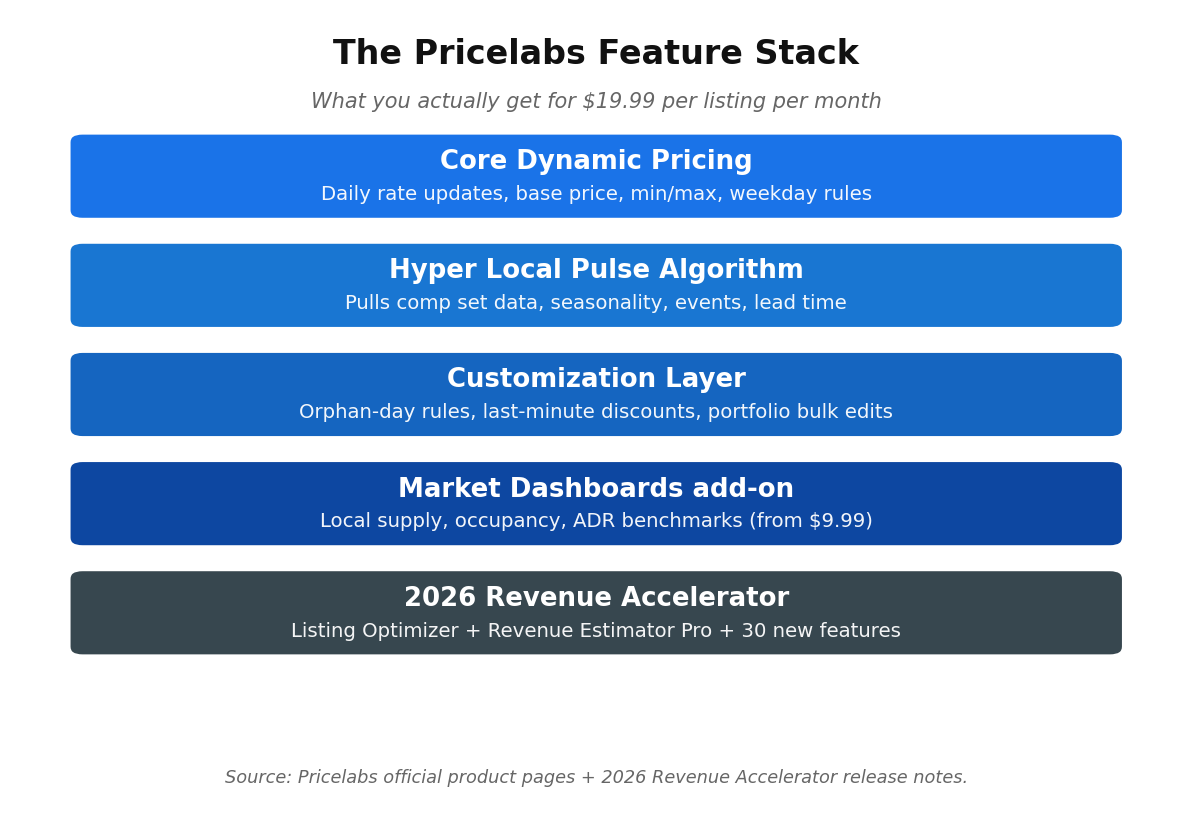
Here is the part most reviews bury. Pricelabs costs $19.99 USD per listing per month if you are in the USA, UK, Canada, Europe, Australia, New Zealand, or Israel. Rest-of-world pricing is $9.99 per listing per month. There is also an alternative billing plan at 1% of total booking revenue from integrated platforms if you prefer a usage-based model. These rates are pulled from the official Pricelabs pricing page as of May 2026, so check the live page before you sign up because pricing changes.
A few things worth knowing about the cost structure:
- Volume discounts kick in from your second listing. Pricelabs uses a sliding scale, so the more listings you run the lower your per-listing cost. The exact discount tiers are not published publicly, you see them at checkout.
- 30-day free trial, no credit card. You can add your listings, watch the recommended rates for a month, and decide. This is rare in the SaaS world.
- Market Dashboards is a separate product at $9.99 and up for a 1,000-listing market report. Most operators do not need this on day one.
- Revenue Estimator Pro, their newer product, costs $10 per month for 2 estimates, $45 for 15, or $125 for 50. Useful if you underwrite a lot of deals.
- The 2026 Revenue Accelerator release bundled 30+ new features into the platform, including Listing Optimizer (AI suggestions for your title, description, and amenities) and expanded comp set tools. Most of these are included in the core $19.99 fee.
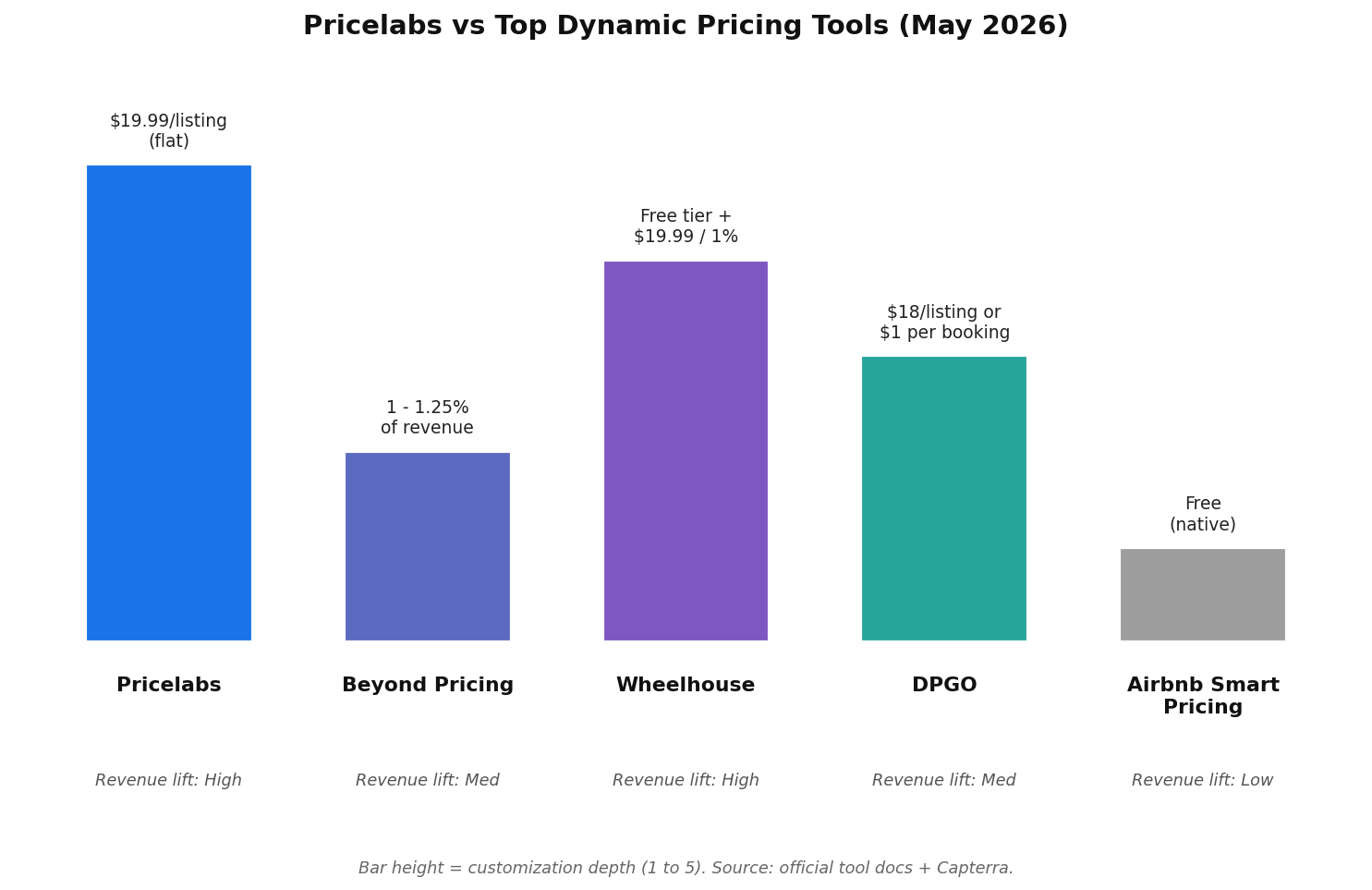
How does that compare to alternatives? Beyond Pricing charges 1 to 1.25 percent of revenue with no flat-fee option. On a property doing $5,000 a month in bookings, that is $50 to $62 in fees versus $19.99 on Pricelabs. Wheelhouse offers a free tier plus the same $19.99 flat or 1% revenue choice. DPGO sits at $18 per listing or $1 per booked night. Airbnb’s Smart Pricing is free, which is exactly what it is worth (more on that in a minute).
For a portfolio operator running 10 listings averaging $3,000 a month in revenue, the math looks like this. Pricelabs costs about $200 a month after volume discounts. Beyond Pricing on the same portfolio costs $300 to $375. That delta alone pays for one decent meal out per listing per year. Not life-changing money, but real money that compounds.
Pricelabs features that actually matter
Pricelabs has dozens of features. Most operators use about eight of them. Here is what you actually need to understand to evaluate the tool.
1. Hyper Local Pulse pricing algorithm
This is the core engine. Hyper Local Pulse pulls data from comparable listings in your immediate area, blends it with seasonality, day-of-week patterns, local events, holidays, and booking pacing, then outputs a recommended nightly rate for every date in your calendar. The algorithm runs daily and updates prices automatically (if you have sync turned on). For a single property the pulse is useful. For a portfolio it is essential, because the algorithm catches local events and demand spikes you would otherwise miss across multiple listings.
What sets it apart from Airbnb’s native Smart Pricing is the data set. Airbnb’s algorithm optimizes for bookings on Airbnb’s platform, which often means pushing your prices down toward your minimum. Pricelabs optimizes for your revenue, which is a fundamentally different objective function. The Pricelabs help center documents this integration in detail.
2. Base price + min/max controls
You set a base price (the rate you would charge on an average Tuesday in shoulder season), a minimum price (the floor), and a maximum price (the ceiling). The algorithm modulates around your base. This is the single most important setup decision in the entire tool. Set your base too low and you leak revenue. Set it too high and you sit empty. Pricelabs’ “Base Price Help” feature analyzes your property against local comps and suggests a starting point, which removes most of the guesswork for new users.
3. Customization rules (the real moat)
This is where Pricelabs separates from every other tool on the market. You can set portfolio-level rules like “increase weekend prices by 20% in summer for all my beach properties” or “drop rates by 15% on any orphan night that creates a 1-night gap between bookings”. The rule engine handles min-stay overrides, last-minute discount caps, far-future pricing rules, day-of-week modifiers, custom seasons, and event-based price bumps.
For operators with 1 or 2 listings, this is overkill. For anyone running 5+ listings or managing across multiple markets, this is the feature that justifies the cost.
4. Market Dashboards (add-on)
The separate Market Dashboards product shows you supply, occupancy, ADR, and revenue trends for your local market. Each dashboard pulls live market data on local supply, occupancy rates, ADR, RevPAN, and events that move demand. It is essentially a competitor to AirDNA at a lower price point. If you already pay for AirDNA you can probably skip the dashboard. If you do not, this is the cheapest way to get serious market data for the price.
5. Native Airbnb integration and rate sync
Pricelabs is one of the few tools with an official Airbnb partnership, which means price updates sync directly to your Airbnb calendar without going through a third-party PMS. The sync runs daily once you flip the toggle on, and the data flow from Pricelabs to your Airbnb listing is direct. This matters because the integration is more reliable and faster than channel-manager-based setups. According to Airbnb’s own help center on Smart Pricing, professional tools take priority over Smart Pricing when both are active, so you need to disable Smart Pricing before connecting Pricelabs.
6. Pricing review and bulk edits
You can review every recommended rate in a calendar grid before it pushes. You can bulk-edit across listings (e.g., “raise all Friday and Saturday rates 10% in Q3”). For portfolio managers this is non-negotiable.
Where Pricelabs wins (the honest pros)
I have been recommending Pricelabs to operators in our community for years, and the reasons have not changed much.
Customization depth no one else offers
Beyond Pricing wants to be the “set it and forget it” option. Wheelhouse wants to be the strategist’s tool. Pricelabs wants to be the operator’s tool, and that is exactly what it delivers. The customizations run deeper than any tool on the market. If you can imagine a pricing rule, Pricelabs has a way to build it. Orphan nights, custom seasons, far-future pricing, day-of-week pricing, last-minute discount caps, weekend lifts, event bumps for things like SXSW or local conferences. It is all there. The customizations also stack, so you can layer market-wide rules on top of listing-specific overrides without breaking the algorithm.
Strong data engine
600,000+ properties feeding the algorithm matters most in tertiary markets. If you host in Miami or Nashville, every tool has plenty of comp listings and market data. If you host in a small mountain town with 80 active rentals, the tool with the deepest market data wins by default. Pricelabs almost always wins those edge cases in my testing because the algorithm has more nearby comparables to anchor on.
Transparent pricing logic
Pricelabs shows you why a rate was recommended. Hover over any night and you see the breakdown: base price, seasonal modifier, day-of-week, demand index, lead-time adjustment, occupancy in the market. Beyond Pricing is a black box. DPGO is a black box. Wheelhouse shows some of this. Pricelabs shows all of it. As an operator, that transparency lets you learn the underlying pricing logic instead of just trusting a number.
Customer support is genuinely good
Pricelabs holds daily onboarding sessions, has a deep help center, and the support service team is fast. Capterra gives them a 4.9 out of 5 across 247 reviews with 4.8 specifically for customer service. I have submitted tickets that came back within 4 hours. For a SaaS service that is rare. The support response time matters because dynamic pricing tools are complex, and you will have questions during your first month of setup.
Multi-platform support
Airbnb, Vrbo, Booking.com, Hostfully, Guesty, OwnerRez, Hostaway, Lodgify, plus 150+ other platforms and PMS integrations. If you run on any major platform, Pricelabs probably connects. Beyond Pricing has fewer integrations. Wheelhouse covers the basics. DPGO is mostly Airbnb-only. For operators running across two or three platforms at once, the breadth of platform support is one of the biggest reasons to pick Pricelabs over the alternatives.
Real revenue impact (when configured right)
In our operator community, students who switch from manual pricing or Airbnb Smart Pricing to a properly configured Pricelabs setup typically see revenue lifts in the 15 to 25 percent range over the first 3 months. The performance lift comes from two things: more bookings during the slow nights the algorithm fills, and higher ADR during the peak nights the algorithm catches. That tracks with what Capterra reviewers report and with what published comparison testing shows. The variance is huge though. Some operators see 30%+ lifts. Others see 5 to 10% because they were already pricing well manually. Pricelabs does not turn a bad listing into a great one, it just stops leaving money on the table on the listing you have. Higher occupancy on slow weeks plus more high-ADR nights on peak weeks is the math that drives the lift.
Where Pricelabs falls short (the honest cons)
This is the part the affiliate-driven Pricelabs reviews skip. So let’s be real.
Steep learning curve
Pricelabs is not plug and play. The interface has hundreds of controls and the documentation, while thorough, assumes you already understand revenue management concepts. New users routinely set up the tool in 30 minutes, see no benefit for 2 weeks, then either quit or finally spend the 4 hours required to configure it properly. Inside our coaching community we walk students through the setup in a single session, but on your own this is the single biggest reason Pricelabs fails operators.
Interface feels dated
The UI was clearly built by engineers for engineers. It works, but it is slow when you load a 50-listing portfolio and not particularly intuitive on mobile. Wheelhouse looks like a 2025 design. Pricelabs looks like a 2018 design with a polish update. They are slowly modernizing, but if visual design matters to you, you will notice.
Algorithmic dips in shoulder seasons
This is the one Pricelabs critics flag most often, and it is real. The algorithm can over-correct downward during weird transitional weeks (late January, early November, post-holiday lulls) and recommend rates that feel low even by realistic shoulder-season standards. I have seen it recommend $89 a night on a property that holds $130 with no problem. Your minimums are the safety net here. The fix is to set a more aggressive minimum (aggressive minimums protect your floor) and to use the customization rules to floor your shoulder-season rates. But if you blindly trust the algorithm, you will leave money on the table some weeks.
Length-of-stay discount stacking issue
When Pricelabs changes your nightly rates, it cannot also adjust the matching rule sets inside Airbnb. So if you have a 10% weekly discount enabled on Airbnb and Pricelabs drops your nightly rate 20% during a slow period, you end up with a 28% effective discount on a 7+ night booking. Result: someone books a week at fire-sale rates. The workaround is to manage your length-of-stay discounts inside Pricelabs instead of on Airbnb directly. Not a deal breaker, but a real gotcha.
Not for one-listing passive operators
If you have one Airbnb and you treat it like passive income, Pricelabs is more tool than you need. Wheelhouse Free or Beyond Pricing’s set-and-forget model will get you 80% of the value with 20% of the setup work. Pricelabs starts to pay off at 2+ listings or when you are willing to actively manage your pricing strategy.
Pricelabs occasional rate weirdness
Even with everything configured, the algorithm sometimes recommends rates that feel off. Maybe it picked up a single comp listing with bad data, maybe a one-off event in your market skewed the calculation. Operators in our community check the recommended rates weekly. The tool gives you a “review” view that highlights the biggest changes from your previous rate so you can spot the weird ones. This is not a “set it and forget it” tool, even at 5+ listings.
Pricelabs vs the alternatives (side-by-side)
Here is the comparison table I wish someone had handed me when I was evaluating tools three years ago. All data verified against each tool’s public pricing page and feature documentation as of May 2026.
| Tool | Cost (May 2026) | Customization | Best For |
|---|---|---|---|
| Pricelabs | $19.99/listing flat (or 1% rev) | Very high (rule-based) | 2+ listings, operators who want control |
| Beyond Pricing | 1 to 1.25% of revenue | Moderate | Set and forget operators, single listings |
| Wheelhouse | Free tier + $19.99 or 1% | High (strategy presets) | First-time tool users, pace-tracking fans |
| DPGO | $18/listing or $1/booked night | Medium (AI-driven) | Budget operators, Airbnb-only hosts |
| Airbnb Smart Pricing | Free (native) | Very low (min/max only) | Hosts who want zero setup (and lose 15 to 25% revenue) |
The pattern is consistent. Pricelabs and Wheelhouse Pro are functionally similar in price ($19.99). Beyond is the simple, more expensive set-and-forget option. DPGO is the budget play. Airbnb Smart Pricing is the option that costs you the most in lost revenue even though it is “free”. For a fuller breakdown including Hostaway’s pricing module and Smartpricing, see our dynamic pricing tools comparison.
Who should actually use Pricelabs
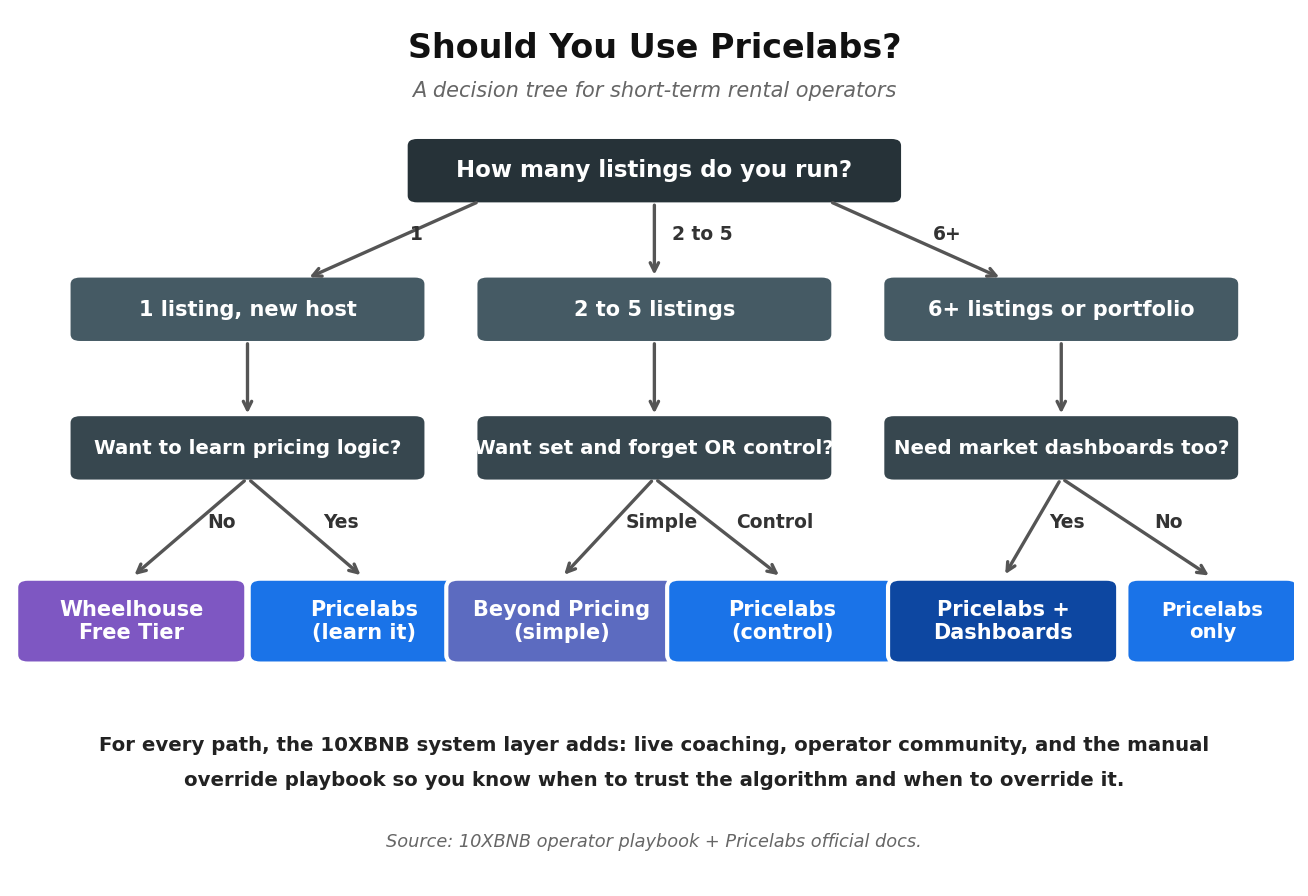
Here is the framework I walk students through when they ask whether Pricelabs is the right pick for their situation.
Use Pricelabs if:
- You run 2 or more listings and want one tool across all your property assets.
- You manage across multiple markets and need portfolio-level rules.
- You want to understand WHY a rate was recommended, not just trust a number.
- You operate in a tertiary or seasonal market where data depth matters.
- You want a flat per-listing cost instead of a revenue-share model.
- You need market events and demand spikes baked into your pricing automatically.
- You are willing to spend 3 to 4 hours on initial setup to get the long-term payoff.
Do not use Pricelabs if:
- You have exactly one listing and treat it as passive income. (Try Wheelhouse Free or Beyond.)
- You want zero setup. (Beyond Pricing wins on simplicity.)
- Your listing is in an ultra-mature urban market and you already know your rates by heart. (You may not need any tool.)
- You are not willing to review the algorithm’s recommendations weekly. (No dynamic pricing tool works on autopilot.)
How 10XBNB students actually use Pricelabs
This is the part that separates an operator running Pricelabs blindly from one running it as part of a system. Tools amplify the operator. They do not replace operator judgment.
Here is the playbook our students use inside the 10XBNB community. None of this is software. All of it is the operator framework that sits around whichever tool you choose.
- Set the base price using comp analysis, not the algorithm. We teach students to pull 8 to 12 comparable listings in their market, look at their actual booked rates over the trailing 90 days, and calculate the median for a typical Tuesday in shoulder season. That becomes your Pricelabs base price. The “Base Price Help” feature is a starting point, not the answer.
- Floor your minimums aggressively. If your break-even nightly rate is $90, your Pricelabs minimum is $110, not $90. The minimums you set become the floor the algorithm respects. The algorithm will push toward your minimum during slow weeks. Make sure that floor is still profitable, because your minimums directly cap how much rate damage the algorithm can do during a soft demand window. Aggressive minimums also help you capture last minute bookings at a profitable rate rather than a fire-sale.
- Configure the orphan-day rule. A 1-night gap between bookings is dead inventory. Pricelabs lets you auto-discount those nights by 15 to 25%. Most operators forget to enable this. Easy revenue.
- Cap last-minute discounts. By default Pricelabs will discount aggressively as a date approaches. We teach students to cap that discount at 20% off base. Otherwise the algorithm will fire-sale a property on a Tuesday three days out when a $40 discount would have filled it just as well.
- Weekly rate review. Every Sunday, students open Pricelabs and scan the “biggest changes” view. They override 2 to 5% of the recommendations based on local context (a sports tournament the algorithm missed, a weather event, a holiday they know prices high). The other 95 to 98% they leave alone.
- Quarterly base-price reset. Markets shift. Comps shift. Your base price from January is wrong by May. We teach quarterly base-price resets using fresh comp data.
This is the “operator system” layer the tool itself does not include. When a student combines Pricelabs (or any dynamic pricing tool) with this framework, they typically see another 10 to 15% revenue lift on top of what the tool alone delivers. That is where the real lift comes from. The tool is necessary. The operator system is what makes it work.
Inside 10XBNB we run live group coaching calls where students bring their Pricelabs dashboards and we troubleshoot in real time. The community shares market-specific overrides, seasonal playbooks, and edge-case rules. That mentorship layer is what separates the operators making $4,000 a month per listing from the ones making $7,000 a month per listing on the same property. The tool is only as good as the operator running it.
Ready to set up Pricelabs the right way? Book a free coaching call with our team. We will look at your current setup, identify the 3 to 5 rules you should change today, and map a 30-day plan to get the most out of the tool. Book your free coaching call here.
Pricelabs vs Airbnb Smart Pricing (a quick aside)
I get this question a lot, so let me address it directly. Airbnb Smart Pricing is free. Pricelabs costs $19.99 per listing per month. Why not just use the free option?
Because Airbnb’s Smart Pricing optimizes for what is good for Airbnb, not what is good for you. Airbnb wants high occupancy on its platform. You want high revenue per available night. Those are different objectives. Per published testing on multiple comparison sites and confirmed by years of community data, third-party pricing tools (Pricelabs, Beyond, Wheelhouse) outperform Smart Pricing by roughly 15 to 25 percent in revenue. On a $4,000-a-month listing, that is $600 to $1,000 in additional revenue per month. The $19.99 tool fee is rounding error compared to that lift.
The other issue with Smart Pricing is that it consistently pushes prices toward your minimum. Hosts on the Airbnb community forums have been documenting this for years. Set your minimum at $80, and Smart Pricing will happily recommend $82 on a Friday night in peak season. Pricelabs would recommend $180. You can see why “free” is the most expensive option.
Pricelabs alternatives worth considering
Pricelabs is not the only answer. For a deeper breakdown see our best Airbnb analytics tools roundup and the full Airbnb tools guide. Here are the three I would actually recommend operators evaluate alongside Pricelabs.
Beyond Pricing
Best if you want true set-and-forget pricing with minimal ongoing management. Beyond charges 1 to 1.25% of revenue, so on a small listing it can actually be cheaper than Pricelabs. The platform is more polished, the onboarding is faster, and the support team is solid. The trade-off is depth of customization. You cannot fine-tune the way you can in Pricelabs. For passive operators with 1 to 3 listings, Beyond is often the better fit.
Wheelhouse
Best for first-time users and operators in competitive markets who want pace tracking (how fast your dates are filling vs. the market). Wheelhouse has a unique pacing dashboard that no other tool matches. It also offers a genuine free tier, so you can dynamic-price a single listing at zero cost. The data set is smaller than Pricelabs, which can hurt in thin markets.
DPGO
Best for budget-conscious Airbnb-only operators. DPGO sits at $18 per listing flat or $1 per booked night, which is the cheapest credible option. The AI improves over the first 60 to 90 days but starts noticeably weaker than Pricelabs. If you are running a single Airbnb arbitrage unit and counting every dollar, DPGO is worth a look. If you are running 10+ listings or operating on Vrbo and Booking.com too, Pricelabs is the better long-term fit.
And if you are running short-term rental arbitrage and want to figure out whether a unit even makes sense before you pick a pricing tool, run the numbers in our free Airbnb arbitrage calculator first.
Pricelabs review: final verdict (May 2026)
Pricelabs is the best dynamic pricing tool for short-term rental operators running 2 or more listings in 2026. Period. The combination of $19.99 flat per-listing pricing, 600,000+ properties of comp data, customization rules no other tool matches, and a clear pricing logic you can actually learn from makes it the strongest pick for serious operators. My honest rating: 4.3 out of 5. I dock points for the learning curve, the dated interface, and the occasional shoulder-season algorithmic dips, all of which are real friction points.
For one-listing passive operators, Wheelhouse Free or Beyond Pricing will probably serve you better with less setup. For everyone else, Pricelabs is what I recommend. Just remember the rule: the tool is one piece of a bigger pricing system. The operator framework around it is what actually drives the revenue lift.
If you want help setting it up properly, or if you are not sure whether Pricelabs is right for your specific market, that is exactly what our team does on free coaching calls. We have run Pricelabs on hundreds of properties across dozens of markets, and we know the rules that work, the ones that do not, and the market-specific quirks the official docs do not cover. Book your free call here and let’s get your pricing dialed in. You can also read our student results page to see what operators in the community have done with these systems.
Frequently asked questions
Is Pricelabs worth it for one Airbnb?
If you only own one property, Pricelabs is more tool than most operators need. The $19.99 monthly cost is justified if you treat the listing actively and use Pricelabs to learn pricing logic, but if you just want a price that adjusts automatically without you thinking about it, Wheelhouse Free or Beyond Pricing’s simpler interface will serve you better. Pricelabs pays off most clearly at 2+ listings or when you are willing to spend a few hours learning the rule engine.
How much does Pricelabs cost in 2026?
As of May 2026, Pricelabs costs $19.99 USD per listing per month in the USA, UK, Canada, Europe, Australia, New Zealand, and Israel. Rest-of-world pricing is $9.99 per listing per month. There is also a 1% of revenue alternative billing plan. Volume discounts kick in from your second listing. Add-ons like Market Dashboards ($9.99+) and Revenue Estimator Pro ($10 to $125) are separate. Always check the live Pricelabs pricing page before signing up.
Is Pricelabs better than Airbnb Smart Pricing?
Yes, by a wide margin. Airbnb’s Smart Pricing optimizes for occupancy on Airbnb, which usually means pushing your rates toward your minimum. Pricelabs optimizes for your revenue. Published comparison testing across the industry consistently shows third-party pricing tools beating Smart Pricing by 15 to 25 percent in revenue, and Pricelabs is the deepest of those tools. If you are using Smart Pricing right now, switching to Pricelabs will almost certainly pay for itself in the first month.
What are the best Pricelabs alternatives?
The three best alternatives are Beyond Pricing (best for set-and-forget operators, 1 to 1.25% of revenue), Wheelhouse (best for first-time users, has a free tier), and DPGO (cheapest at $18 per listing or $1 per booked night). Each wins for a specific use case but none match Pricelabs on customization depth or data set size. For a full side-by-side see our dynamic pricing tools comparison.
Does Pricelabs work with Vrbo and Booking.com?
Yes. Pricelabs integrates with Airbnb, Vrbo, Booking.com, and 160+ other platforms and property management systems including Hostfully, Guesty, OwnerRez, Hostaway, and Lodgify. The Airbnb integration is official (direct partner), the others go through your PMS or direct channel connection. This multi-platform support is one of Pricelabs’ biggest advantages over competitors.
How long does it take to set up Pricelabs properly?
A bare-minimum setup takes about 30 minutes. A proper setup (base price calibration, min/max rules, orphan-day discounts, last-minute caps, custom seasons, dashboard configuration) takes 3 to 4 hours per market. After that, ongoing maintenance is about 15 to 20 minutes per week per property for the rate review. Most operators who quit Pricelabs do so because they did the 30-minute setup, did not get great results, and gave up before doing the real configuration work. Plan for the longer setup time up front and the tool pays off; rush it and you will be one of the operators leaving bad reviews online.
Will Pricelabs hurt my Airbnb search ranking?
No. Per Pricelabs’ own documentation and Airbnb’s official help center, using a third-party pricing tool does not negatively affect your search ranking. What can hurt ranking is having Smart Pricing and a third-party tool both active simultaneously, which creates conflicting rate updates. Disable Smart Pricing before connecting Pricelabs. Consistent pricing, fast response time, and high acceptance rate are what actually matter for Airbnb ranking.
Related Operator Deep Dives
Other reviews and comparisons in this cluster operators have found useful: