
Your airbnb pricing strategy is the single biggest lever you have for revenue. Get it right, and you pull an extra $500-$1,500 per month from the same property with the same guests. Get it wrong, and you’re either scaring away bookings with rates that are too high or hemorrhaging money by charging $89 a night when every comparable listing is getting $149.
I’ve watched arbitrage hosts lose thousands of dollars a year because they set a price once and never touched it again. Flat pricing might feel safe, but it’s the equivalent of driving with your eyes closed. Market demand shifts every single week, during peak demand periods, you’re leaving cash on the table, and during slow stretches, you’re sitting vacant while similar listings around you are getting booked.
This guide breaks down every pricing decision a rental arbitrage host needs to make, from calculating your base price to deploying dynamic pricing software to squeezing extra revenue out of local events. No fluff. Just the frameworks, formulas, and real numbers that actually move the needle.
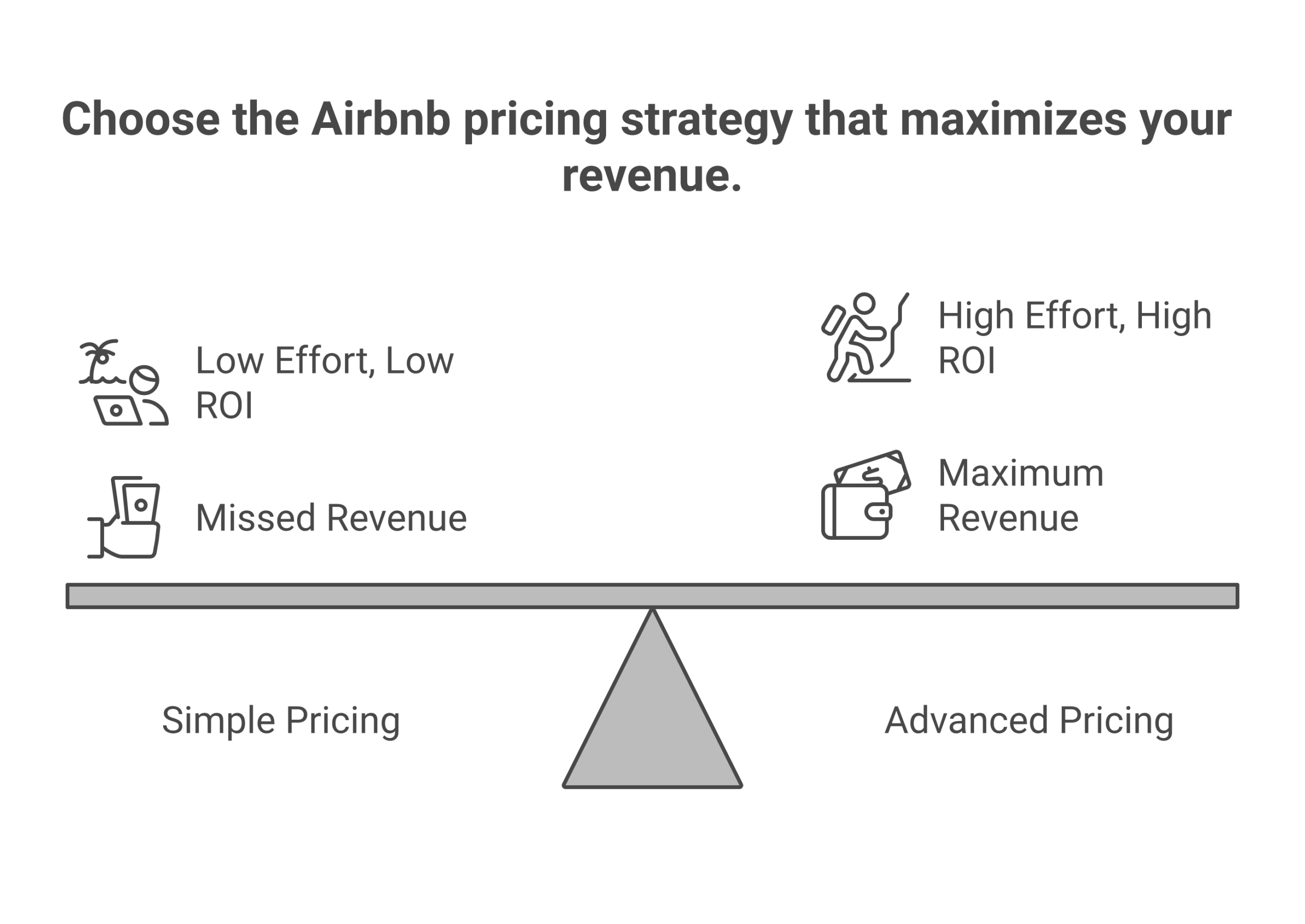
Why Most Hosts Get Their Airbnb Pricing Strategy Wrong
After working with hundreds of arbitrage operators and analyzing thousands of listings across competitive markets, I keep seeing the same three mistakes destroy what should be profitable businesses.
Mistake #1: The “Set It and Forget It” Trap
You find a nightly rate that feels right, maybe $150, and you leave it there for six months. Meanwhile, a new convention center opens three miles away, competitor pricing drops 20% across the board, and your market shifts from peak season to shoulder season. That static $150 is now either leaving $40 on the table during busy weekends or sitting vacant on Tuesday nights because you’re $30 above what similar listings are charging.
Static pricing is the #1 revenue killer for short-term rental hosts. A 2025 study across 541 listings in 34 countries found that hosts who switch from flat pricing to dynamic pricing see revenue increases of 15-36%, with the average landing around 20-25%. On a property generating $3,000/month, that’s an extra $600-$750 showing up in your bank account every single month.
Mistake #2: Racing to the Bottom
New hosts panic when they don’t get bookings in the first two weeks. So they slash their rate from $140 to $99, then $89, then $79. Now they’re booked solid, and losing money after rent, utilities, supplies, and cleaning. Worse, they’ve trained the algorithm to associate their listing with bargain-bin pricing, making it harder to raise rates later.
If you’re doing rental arbitrage, you have fixed operational costs that don’t care about your feelings. Your landlord wants rent on the first. Your cleaner charges per turnover. Your Wi-Fi bill doesn’t shrink because you dropped your rate. Racing to the bottom is a fast track to an unsustainable business. Before you start slashing, run the numbers through our startup costs breakdown to see what your real floor is.
Mistake #3: Trusting Airbnb Smart Pricing Blindly
I’ll say this once: stop using Airbnb Smart Pricing as your sole pricing tool. It optimizes for THEIR revenue, not yours. Airbnb earns a service fee on every booking. More bookings at lower prices = more fees for Airbnb. Smart pricing consistently underprices listings by 15-40% compared to market-optimized rates. It’s a starting point at best, a revenue destroyer at worst.
One arbitrage host I know in Nashville switched from Smart Pricing to PriceLabs and saw his average nightly rate jump from $127 to $168, a 32% increase, while his occupancy only dropped from 84% to 79%. Net revenue went up $1,100/month on a single property. That’s the difference between scraping by and building actual wealth.
The 5 Airbnb Pricing Models Explained
Before you pick a strategy, you need to understand the pricing model options available. Each has trade-offs between simplicity, control, and revenue potential.
| Pricing Model | How It Works | Revenue Potential | Best For |
|---|---|---|---|
| Flat Pricing | Same nightly price year-round, no adjustments | Low, leaves 15-40% on the table | Beginners who haven’t learned better yet |
| Manual Seasonal | Adjust rates 3-4 times per year by season | Moderate, captures seasonal swings | Hosts with 1-2 properties and time to monitor |
| Dynamic Pricing (Tools) | Software automatically adjusts rates daily based on market demand, competitor pricing, and events | High, captures micro-demand shifts | Serious hosts managing multiple listings |
| Event-Based Pricing | Manual overrides layered on top of any base model for concerts, festivals, conferences | Very High, windfall potential | Hosts in event-heavy markets |
| Hybrid | Dynamic pricing tool + manual event overrides + length of stay discounts | Maximum, best of all approaches | Anyone serious about building a real business |
The hybrid model is what I run on every one of my properties, and it’s what I teach inside the 10XBNB framework. Dynamic pricing software handles the daily adjustments that no human can keep up with, while manual overrides capture the event-based pricing opportunities that algorithms sometimes miss.
The 3 Pricing Pillars: Base Price, Seasonal Adjustments, Event Pricing
Every solid airbnb pricing strategy rests on three pillars. Miss one, and you’re building on sand.
| Pillar | What It Controls | Revenue Impact |
|---|---|---|
| Base Price | Your default nightly price during normal demand | Sets your revenue floor, get this wrong and everything else falls apart |
| Seasonal Adjustments | Rate modifications for high, shoulder, and low seasons | Can swing revenue 30-60% between peak and trough months |
| Event-Based Pricing | Premium rates for concerts, festivals, conferences, sports | Single weekend events can generate 2-3x your normal weekly revenue |
These three pillars work together. Your base price anchors your calendar. Seasonal pricing shifts that anchor up or down based on predictable market trends. Event-based pricing layers on top for specific high-demand dates when you can charge a premium. Think of it like a sound mixer, base price is your volume knob, seasonality is the EQ, and events are the boost button you hit when the chorus drops.
How to Set Your Base Price (3 Methods That Actually Work)
Your base price is the single most important number in your pricing strategy. It’s where your calendar defaults when there’s nothing unusual happening. No holidays, no festivals, no seasonal surge.
Method 1: Competitive Analysis (The Market Method)
This is the most reliable approach. Here’s the step-by-step for analyzing competitor pricing in your market:
- Find 10-15 similar listings in your area. Match on: property type (apartment, house, condo), bedroom count, guest capacity, neighborhood (within 2 miles), amenities (hot tub, pool, parking), and Superhost status.
- Pull their nightly rates for a mid-week night 3-4 weeks out. This avoids seasonal and last-minute distortion.
- Calculate the median, not the average. Averages get skewed by one luxury listing at $400 or one basement apartment at $50. The median gives you the true market center.
- Position yourself relative to that median based on your listing’s strengths and weaknesses. Better photos and reviews? Add 10-15%. New listing with no reviews? Subtract 10-15% until you hit 5-10 reviews.
For example, if your 10 comps have rates of $115, $125, $130, $135, $140, $145, $150, $155, $170, $190, the median is $142. If your listing has a hot tub and theirs don’t, set your base at $155-$160. If you’re brand new with zero reviews, start at $120-$125 to build momentum. Do this market research at least quarterly, because competitor pricing shifts constantly in competitive markets.
Method 2: RevPAN Formula (Revenue Per Available Night)
RevPAN is the metric that actually matters for profitability. A $200/night rate at 50% occupancy ($3,000/month) is worse than $140/night at 80% occupancy ($3,360/month). RevPAN captures both rate and occupancy in a single number.
RevPAN = Total Revenue / Total Available Nights
For a 30-day month: if you earned $4,200 and had all 30 nights available, your RevPAN is $140. That’s your true per-night earning power.
To set your base price using RevPAN, work backward from your target:
- Determine your target monthly revenue (say $4,500)
- Divide by 30 = target RevPAN of $150
- Estimate realistic occupancy rates for your market (let’s say 75%)
- Base price = target RevPAN / occupancy = $150 / 0.75 = $200/night
Then validate against market comps. If $200 is 40% above your competitive median, either your revenue target is unrealistic or you need to differentiate your listing to justify the premium.
Method 3: Cost-Plus (The Arbitrage Method)
This is critical for rental arbitrage hosts because you have a hard cost floor that traditional owners don’t. Your monthly rent doesn’t care about market conditions.
Minimum Rate = (Monthly Rent + Utilities + Insurance + Supplies + Cleaning Reserve + Target Profit) / Expected Booked Nights
Let’s run real numbers. Use the profit calculator to plug in your specific situation:
| Expense Category | Monthly Cost |
|---|---|
| Rent | $1,800 |
| Utilities (electric, water, gas, internet) | $350 |
| Renters Insurance + STR Insurance | $120 |
| Supplies (toiletries, coffee, paper goods) | $80 |
| Cleaning Reserve (8 turnovers x $85) | $680 |
| Maintenance/Repairs Reserve | $150 |
| Target Profit | $1,200 |
| Total Needed | $4,380 |
At 75% occupancy (22.5 booked nights): $4,380 / 22.5 = $195/night minimum
That’s your floor. You cannot consistently price below $195 and hit your profit target. If your market comps say $160 is the median, you need to either find a cheaper property, reduce operating costs, or add amenities that justify a $195+ rate.
Dynamic Pricing Tools Compared (2026 Pricing)
Manual pricing is like driving with a paper map in 2026. It technically works, but you’re going to miss turns, take wrong exits, and arrive late. A dynamic pricing tool uses algorithms, market data, and demand signals to automatically adjust your rates daily. Over 70% of successful hosts now use some form of automated pricing.
I’ve tested all the major tools across multiple properties. Here’s my honest breakdown with current pricing as of early 2026.
PriceLabs, Best Dynamic Pricing Software for Data-Driven Hosts
Cost: $19.99/listing/month (volume discounts available); also offers a 1% of revenue option
PriceLabs is the dynamic pricing tool I recommend to most arbitrage operators, and it’s not close. The customization depth is unmatched. You can set rules based on occupancy thresholds, booking windows, orphan days, day-of-week adjustments, and length-of-stay discounts, all layered on top of their market data engine.
What makes it stand out:
- Most granular control of any tool on the market. You can fine-tune every variable
- Neighborhood-level competitor pricing data (not just city-wide averages)
- Customizable min/max price guardrails prevent catastrophic underpricing
- Orphan day pricing automatically fills 1-2 day gaps between bookings
- Integrates with 100+ PMS platforms and channel managers
- Market Dashboards let you track market trends and occupancy rates across your entire area
Drawbacks:
- Interface isn’t pretty, looks like it was designed by engineers (because it was)
- Learning curve is steeper than Beyond or Smart Pricing
- Can feel overwhelming if you’re managing just 1-2 properties
Best for: Hosts managing multiple listings who want maximum control over pricing changes. Pairs perfectly with the automation tools stack.
Beyond Pricing, Best for Beginners Who Want Hands-Off
Cost: 1% of booking revenue (Growth plan); 1.25% (Pro plan)
Beyond Pricing powers over 340,000 listings globally and it’s the easiest tool to set up. You connect your calendar, set your minimum price, and it starts working. The 1% revenue model means you only pay when you earn, zero risk.
What makes it stand out:
- Dead simple setup, literally takes 10 minutes
- Clean, intuitive dashboard with Health Score feature
- Revenue-based pricing creates alignment of incentives (they make more when you make more)
- Solid for hosts who want to boost occupancy without babysitting spreadsheets
Drawbacks:
- Less customization than PriceLabs or Wheelhouse
- 1% fee adds up fast on high-revenue properties ($60k/year = $600 in fees)
- Limited rule-based overrides for event-based pricing
Best for: New hosts who want a “set it and improve” approach without a steep learning curve.
Wheelhouse, Best Interface for Custom Comp Sets
Cost: $19.99/listing/month flat fee OR 1% of revenue (your choice)
Wheelhouse has the best user interface of any dynamic pricing software, hands down. Their “Comp Sets” feature lets you hand-pick the exact similar listings you want to price against. Instead of relying on the algorithm to guess your competitors. Users report an average 40% profitability increase after implementation.
What makes it stand out:
- Beautiful interface with clear data visualization
- Custom comp sets, choose your own competitors and track their pricing changes
- Flexible pricing model (flat fee or commission, your call)
- Analyzes over 10 billion data points daily to optimize revenue
Drawbacks:
- Smaller market coverage than PriceLabs in some international markets
- Some advanced features locked behind Pro tier
Best for: Hosts who want hands-on control with a polished interface. Great middle ground between PriceLabs’ complexity and Beyond’s simplicity.
DPGO, The Newcomer Worth Watching
Cost: $18/listing/month flat fee OR $1/night booked
DPGO (Dynamic Pricing for Guest-centric Optimization) is newer to the market but claims to factor in over 200 data points per pricing decision, including weather forecasts, flight search volume, and social media event mentions. I’ve tested it on two properties for three months.
What makes it stand out:
- Unique data sources most tools don’t use (weather, flight searches)
- $1/night model is cheap for high-occupancy listings
- Machine learning algorithm that improves over time with your specific data
Drawbacks:
- Market coverage isn’t as deep as PriceLabs or Beyond in most areas
- Newer platform means less community support and fewer integration partners
- Still building out features that PriceLabs has had for years
Best for: Adventurous hosts willing to test a newer platform alongside their primary tool.
Airbnb Smart Pricing, Why You Should Never Use It Alone
Cost: Free (built into Airbnb)
I get the appeal. It’s free, it’s built right into your dashboard, and Airbnb tells you it will “maximize your earnings.” That last part is misleading. Smart pricing maximizes Airbnb’s earnings, not yours. Here’s why:
- Airbnb earns a service fee on EVERY booking. More bookings = more fees for Airbnb, even if each booking is underpriced for you
- Smart pricing aggressively drops rates to fill your calendar. Filling 95% of nights at $100 earns Airbnb more in fees than filling 80% of nights at $145. But it earns YOU less
- It has zero understanding of your operating costs, profit margins, or business model
- It doesn’t account for local events that aren’t on Airbnb’s radar (local festivals, college move-in weekends, corporate conferences)
- It can’t handle detailed pricing changes for orphan days, length of stay discounts, or far-in-advance bookings
If you use airbnb smart pricing at all, treat it as one data point among many. Set your minimum price 20-30% above your true floor, and override it for weekends, events, and peak demand dates.
Quick Tool Comparison Table
| Tool | Cost | Best For | Customization | Setup Time |
|---|---|---|---|---|
| PriceLabs | $19.99/listing/mo or 1% | Data-driven hosts, 3+ properties | Highest | 30-60 min |
| Beyond Pricing | 1% of revenue | Beginners, hands-off hosts | Moderate | 10 min |
| Wheelhouse | $19.99/mo or 1% | Custom rule builders, visual dashboards | High | 20-30 min |
| DPGO | $18/mo or $1/night | Early adopters, weather-driven markets | Moderate | 15-20 min |
| Airbnb Smart Pricing | Free | Supplemental data only | Minimal | 2 min |
For a deep dive on each tool with side-by-side feature breakdowns, read our full dynamic pricing tools comparison.
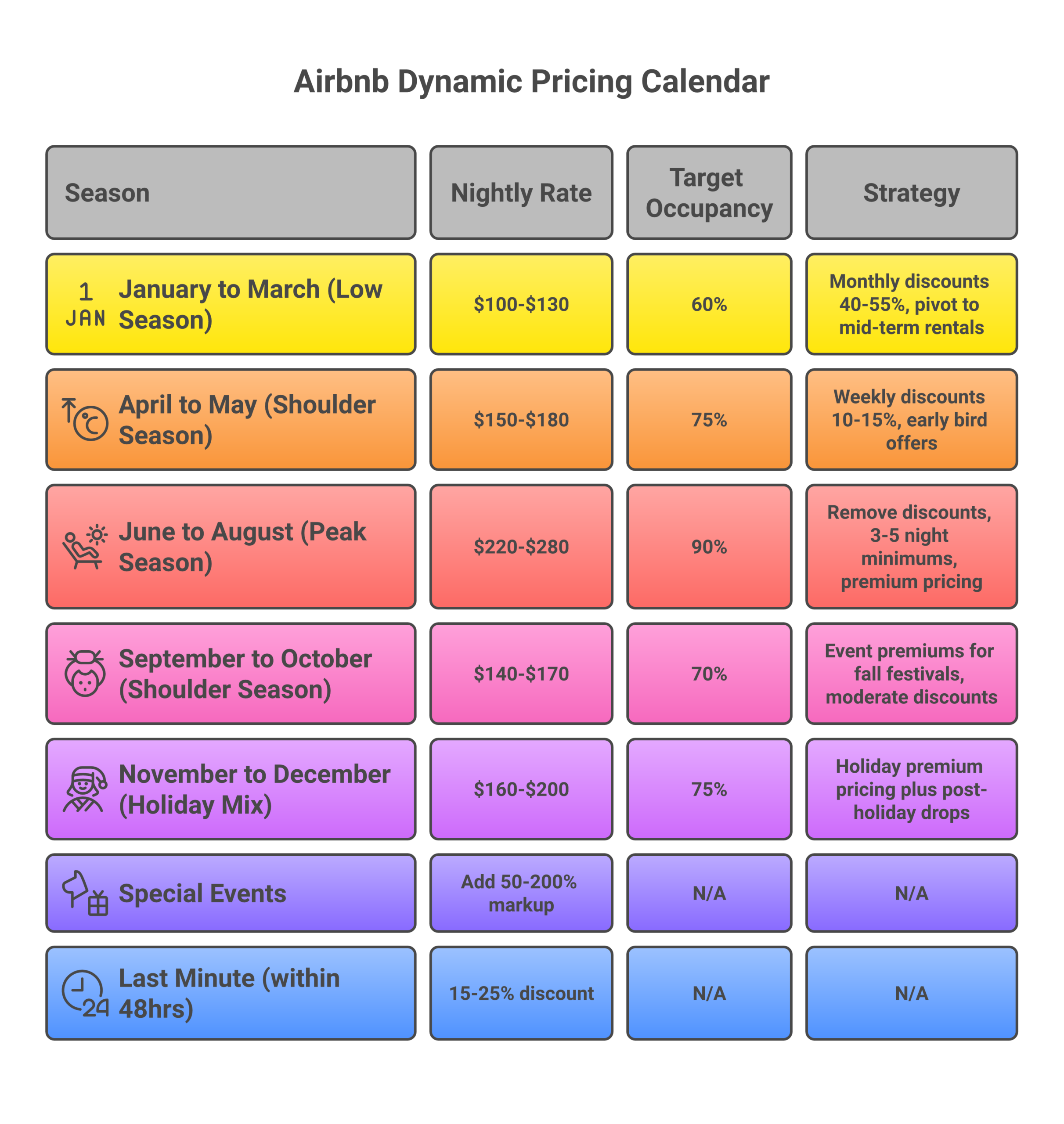
Seasonal Pricing Strategy: Adjusting for Market Demand
If your winter rates match your summer rates in a vacation market, you’re either overpriced in winter or underpriced in summer. Either way, you’re leaving money on the table. Seasonal pricing isn’t optional. It’s physics. Market demand shifts, and your nightly rate needs to shift with it.
High Season (Premium Pricing)
High season is when peak demand outstrips supply. This is your time to maximize revenue per booking, not maximize bookings.
- Rate: 25-50% above your base price, depending on how competitive your market is
- Minimum stays: 3-5 nights minimum to reduce turnover costs and capture premium guests
- Discounts: Remove or reduce weekly and monthly discounts. Demand is doing the selling for you
- Booking window: Price high early. You can always lower later. You can’t raise a confirmed booking
Real example: A 2-bedroom in Scottsdale, AZ goes from $165/night base to $245/night during spring training (February-March) and $275 during special event weekends. That 67% premium is absolutely justified when comparable inventory sells out 6 weeks in advance.
Shoulder Season (Competitive Pricing)
Shoulder season is the transition zone. Demand is moderate. You’re not in a bidding war, but your calendar shouldn’t be empty either.
- Rate: Base price to 10% below, adjusted weekly based on booking pace
- Minimum stays: 2 nights (reduce friction for weekend travelers)
- Discounts: Offer discounts of 10-15% for weekly stays to capture 5-7 night bookings
- Promotions: Use Airbnb’s “New Listing Promotion” or early bird discounts of 10-20% for bookings made 60+ days out
Low Season (Survival Mode + Mid-Term Pivots)
Low season separates arbitrage hosts who survive from those who don’t. This is where your fixed operational costs hurt the most, rent doesn’t take a vacation.
- Rate: 15-30% below base price, with aggressive last-minute drops (40-50% off within 3 days)
- Minimum stays: 1 night. Remove every possible friction point to boost occupancy
- Monthly discounts: Offer 40-55% monthly discounts to attract mid-term rental guests (traveling nurses, corporate relocations, insurance placements)
- Multi-channel: List on Furnished Finder, Zillow, and Facebook Marketplace for 30+ day stays
The mid-term pivot is your secret weapon. One 30-day booking at $2,400 ($80/night after monthly discount) beats 15 scattered one-night bookings at $100 ($1,500 total) once you factor in cleaning costs and vacancy gaps.
Length of Stay Discounts: When to Offer Them and How Much
Length of stay discounts are one of the most misunderstood tools in airbnb pricing. Some hosts never offer discounts and lose bookings to competitors who do. Others offer discounts so steep they lose money on every extended stay. Here’s how to get your airbnb pricing strategy right.
Weekly Discounts (7+ Nights)
A 10-15% weekly discount is the sweet spot for most markets. Why? Fewer turnovers mean lower cleaning costs, less wear-and-tear, and fewer gaps between bookings. That 10% discount on rate is often offset entirely by the savings on cleaning fees and reduced vacancy.
Example: $175/night x 7 nights = $1,225 at full rate. At 12% weekly discount, that’s $1,078. But you save $85 on one fewer cleaning turnover and eliminate the orphan day risk. Net impact: roughly break-even on revenue with lower operational costs.
Monthly Discounts (28+ Nights)
Monthly discounts of 25-40% sound aggressive, but the math works in your favor during shoulder and low seasons. A guest staying 30 nights means one cleaning, minimal communication, and guaranteed revenue for an entire month.
Example: $175/night x 30 nights = $5,250 at full rate. At 35% monthly discount, that’s $3,413, which still covers $1,800 rent + $350 utilities + $120 insurance + $80 supplies + $85 cleaning = $2,435 in expenses, leaving $978 profit with zero vacancy risk. Compare that to a month where you fill 18 of 30 nights at full rate with 4 turnovers: ($175 x 18), ($85 x 4) = $2,810 revenue. The monthly booking wins.
When NOT to Offer Length of Stay Discounts
- During high season and peak demand when short-stay guests pay premium nightly rates
- During event weekends, never discount dates with known high-demand events
- When your occupancy rates are already above 80%, discounting when you’re filling up just eats margin
Event-Based Pricing: Your Biggest Revenue Opportunity
Event based pricing is where arbitrage hosts make windfall profits. A single festival weekend can generate the same revenue as two normal weeks. But you need a system, not a reaction.
Building Your Local Event Calendar
Every market has a unique event profile. You need to know yours cold. Research the best markets for event-heavy calendars.
- Annual recurring events: Festivals, marathons, college football, conference season, holiday markets. These are predictable, price 6-12 months in advance.
- One-time events: Concert tours, playoff games, major conferences. These require monitoring, set Google Alerts for your city’s convention center and major venues.
- Hidden events: College move-in/graduation weekends, medical conferences, trade shows. These drive massive demand but hosts often miss them because they’re not on mainstream event calendars.
How Much to Charge During Local Events
Event premium tiers based on demand intensity:
| Event Type | Premium Over Base | Examples |
|---|---|---|
| Mega Events | 200-400% | Super Bowl, FIFA World Cup, Olympics |
| Major Events | 100-200% | Music festivals, major concerts, conference keynotes |
| Moderate Events | 50-100% | College football, marathons, regional festivals |
| Minor Events | 25-50% | Trade shows, smaller concerts, corporate retreats |
Here’s the catch with mega events: when the Super Bowl or a major concert comes to a mid-size city, casual hosts flood the market, people listing spare bedrooms, parking lots, even couches. That sudden supply surge can crash the average daily rate. Price aggressively early, then monitor competitor pricing as the event approaches.
Event Pricing Tactics
- Set minimum stays: 3-4 nights for major events to capture the full event window
- Price early, adjust later: Set premium rates 6-9 months out. You can always lower if demand disappoints
- Use cascading minimums: 5-night minimum at 6 months out, drop to 3 nights at 45 days, drop to 1 night at 7 days. Captures premium bookers first, then fills gaps
- Don’t forget the shoulder days: If a festival runs Friday-Sunday, the Thursday and Monday around it carry elevated demand from early arrivals and late departures
Minimum Stay Strategy: How to Maximize RevPAN
Your minimum stay setting is a hidden pricing lever most hosts ignore. Set it too high and you block short-term bookings that would fill gaps. Set it too low and you eat cleaning fee costs on single-night stays that barely break even.
Here’s the framework I use:
| Season | Minimum Stay | Rationale |
|---|---|---|
| High season | 3-5 nights | Capture premium bookings, reduce turnovers, maximize revenue per guest |
| Shoulder season | 2 nights | Balance between occupancy and turnover efficiency |
| Low season | 1 night | Remove all friction, any booking beats vacancy |
| Events/Holidays | 3-4 nights | Lock in multi-night premium bookings around event dates |
| Last minute (3 days out) | 1 night | Fill gaps regardless of season |
The Orphan Day Problem
Orphan days are the 1-2 night gaps between bookings that are too short for your minimum stay requirement. If you have a 3-night minimum and someone checks out Monday with a Thursday check-in, that Tuesday-Wednesday gap sits empty.
Solutions:
- Dynamic minimum stays: Tools like PriceLabs automatically adjust your minimum stay for orphan days
- Gap night discounts: Drop your nightly rate 20-30% for orphan days to attract last-minute bookers
- Manual overrides: Check your calendar weekly and manually open orphan days at reduced minimums
A $100 cleaning fee spread across a 5-night stay adds $20/night to your effective cost. That same cleaning fee on a 1-night orphan day eats your entire margin. Price orphan days accordingly, the goal is covering cleaning + a small profit, not maximizing nightly rate.
Last-Minute vs. Advance Booking Discounts
Both discount types serve different purposes and should be deployed strategically, not automatically.
Last-Minute Discounts (1-7 Days Before Check-In)
An empty night tonight earns exactly $0. A discounted night earns something. But there’s a right way and a wrong way to offer discounts at the last minute.
The right way:
- Gradual reduction: 10% off at 7 days, 15% at 3 days, 20% at 1 day
- Set a hard floor, never go below your cleaning cost + $30
- Apply only to weeknights (Monday-Thursday). Weekend demand usually fills without discounts
- Let your dynamic pricing tool automatically adjust for last-minute gaps
Airbnb’s promotion tool lets you apply discounts of 15-28% on stays booked 1-28 days before check-in. At 20%+ discounts, your listing gets featured in Airbnb emails and shows strikethrough pricing in search results. That visibility boost alone can be worth the discount.
Advance Booking Discounts (30-90 Days Out)
Early bird discounts lock in revenue certainty. For arbitrage hosts with fixed monthly rent, knowing you have 18 nights booked two months from now is incredibly valuable for cash flow planning.
When to use advance discounts:
- Low season: Offer 10-15% for bookings 60+ days out
- New listings: Offer 15-20% to build initial booking momentum and reviews
- Extended stays: Offer 25-40% weekly discounts and 40-55% monthly discounts for bookings 30+ days out
The Cleaning Fee Debate
Your cleaning fee strategy directly impacts booking conversion. Guests disproportionately hate separate cleaning fees, a listing at $130/night + $150 cleaning fee feels more expensive than $155/night + $0 cleaning fee, even though the 3-night total is cheaper ($540 vs $465).
Since April 2025, Airbnb guests worldwide now see total price, including nightly rate, cleaning fee, and service fee, before clicking on a listing. This changes the game. Here are your options:
- Short stays (1-2 nights): Roll your cleaning cost into the nightly price. A $150 cleaning fee on a 1-night stay makes your total price look absurd in search results
- Medium stays (3-7 nights): Keep a moderate cleaning fee ($75-$100). It becomes a smaller percentage of the total
- Long stays (7+ nights): Keep the cleaning fee separate since it makes your nightly rate look lower and is a tiny fraction of the total
Some hosts in competitive markets have eliminated cleaning fees entirely and baked the cost into their nightly rate. They report 15-25% more bookings from the improved search result positioning, which more than offsets the per-night rate increase. Test both approaches with your listing and see what moves the needle for your occupancy rates.
Price Tips for Managing Multiple Listings
Running multiple listings changes your airbnb pricing strategy in ways most guides don’t address. Here are the price tips I wish someone had given me before I scaled past three properties.
Portfolio-Level Pricing
When you manage multiple listings in the same market, you’re essentially competing against yourself. If you have two 2-bedrooms within a mile of each other, pricing them identically means you’re splitting your own demand instead of capturing different segments.
- Differentiate by positioning: Price one at market rate and position it as the “value” option with clean, simple amenities. Price the other 20-30% higher with premium touches (better linens, espresso machine, curated decor)
- Stagger pricing changes: Don’t adjust all your listings simultaneously. Drop one listing’s rate first and see if it fills before touching the others
- Use a single dynamic pricing tool across all properties: Portfolio-level dashboards in PriceLabs and Wheelhouse show market trends across your entire portfolio, so you can spot which properties need attention
Cross-Platform Pricing Consistency
If you list on Airbnb, VRBO, Booking.com, and direct booking sites, your pricing needs to be coordinated. Different platforms have different fee structures, and guests comparison-shop. Check our guide to operating without ownership for platform strategy across channels.
Pricing Psychology That Actually Works
Your nightly price is a number, but how guests perceive that number is psychology. Small tweaks to how you present pricing can increase bookings without changing your actual revenue.
Charm Pricing
$149 feels meaningfully cheaper than $150 to the human brain, even though it’s a $1 difference. This works on Airbnb because guests often filter by price ranges. A listing at $149 appears in the “$100-$150” filter bracket, while $150 gets pushed to “$150-$200.” That filter difference can mean thousands of additional eyeballs on your listing.
Use charm pricing at your base price and for promotional pricing. $199 beats $200. $249 beats $250. Don’t do it for event pricing, when demand is high, round numbers communicate confidence.
Anchor Pricing
Airbnb’s strikethrough pricing feature is a powerful psychological anchor. When guests see “$189 $239” they feel they’re getting a deal, even if $189 was your target rate all along. To trigger strikethrough:
- Set your base rate 15-20% above your true target
- Apply a “new listing” or “weekly” discount that brings it to your real target
- At 20%+ discounts, Airbnb features your listing in promotional emails
The Numbers: A Real Pricing Case Study
Let me walk you through a real scenario based on an actual arbitrage property, a 2-bedroom apartment in a mid-size Southern market.
Before: Flat Pricing (Static Rate Year-Round)
| Metric | Value |
|---|---|
| Base rate | $135/night (fixed, year-round) |
| Average occupancy | 71% |
| Average nightly rate (actual) | $135 |
| RevPAN | $95.85 |
| Monthly revenue | $2,876 |
| Monthly expenses | $2,340 |
| Monthly profit | $536 |
After: Dynamic Pricing (PriceLabs + Manual Event Overrides)
| Metric | Value |
|---|---|
| Base rate range | $109-$219/night (dynamic) |
| Average occupancy | 78% |
| Average nightly rate (actual) | $162 |
| RevPAN | $126.36 |
| Monthly revenue | $3,791 |
| Monthly expenses | $2,480 (slightly higher due to more turnovers) |
| Monthly profit | $1,311 |
What Changed
That’s a $775/month profit increase, a 145% improvement – on the same property, same furnishings, same location.
- Weekday rates dropped 15-20%: Filled more Tuesday/Wednesday nights that were previously vacant at $135
- Weekend rates increased 20-30%: Captured the premium that Friday-Sunday peak demand warranted
- Event weekends priced at $219-$289: Three event weekends generated $2,100 in extra revenue over the quarter
- Orphan days filled: Dynamic minimum stays captured 8 additional nights per quarter
- Monthly stays during slow months: One 28-day booking at $75/night ($2,100) replaced a month that previously earned $1,400
The tool cost $19.99/month. The return was $775/month. That’s a 38:1 ROI. There is no investment in your arbitrage business with a better payback period.
Month-by-Month Revenue Comparison
| Month | Static Revenue | Dynamic Revenue | Difference |
|---|---|---|---|
| January (low) | $2,160 | $2,520 | +$360 |
| February (low) | $2,295 | $2,840 | +$545 |
| March (shoulder) | $2,835 | $3,650 | +$815 |
| April (shoulder + events) | $2,970 | $4,120 | +$1,150 |
| May (high) | $3,240 | $4,380 | +$1,140 |
| June (high) | $3,375 | $4,560 | +$1,185 |
| July (high) | $3,510 | $4,710 | +$1,200 |
| August (high) | $3,375 | $4,490 | +$1,115 |
| September (shoulder) | $2,700 | $3,540 | +$840 |
| October (shoulder + events) | $2,970 | $4,280 | +$1,310 |
| November (low) | $2,295 | $2,730 | +$435 |
| December (mixed) | $2,700 | $3,620 | +$920 |
| Annual Total | $34,425 | $45,440 | +$11,015 |
An extra $11,015 per year from a single property. Factor in the PriceLabs cost of $240/year ($19.99/month), and the net gain is $10,775. If you’re running three arbitrage units, which many 10XBNB students do within their first year. That’s an extra $32,325 annually just from smarter pricing. No new properties. No renovation. No additional marketing spend. Just better numbers.
The biggest wins came from event months (April and October) where manual event overrides captured premiums that airbnb smart pricing would have completely missed.
How to Optimize Revenue Across Every Season
Getting your airbnb pricing strategy right isn’t a one-time event. It’s an ongoing practice that compounds over time. Here’s the action plan to optimize revenue systematically:
- Week 1: Run comp analysis. Set your base price using the market method. Validate against cost-plus to ensure profitability given your operating costs.
- Week 2: Sign up for a dynamic pricing tool, PriceLabs for 3+ properties, Beyond for 1-2. Connect your listing, set minimum and maximum price guardrails.
- Week 3: Build your local events calendar. Set manual overrides for every known event in the next 6 months.
- Week 4: Set seasonal adjustments. Define your high, shoulder, and low season dates. Adjust minimum stays accordingly.
- Ongoing: Review RevPAN weekly. Make pricing changes monthly based on market trends. Update event calendar as new events are announced. Track your occupancy rates against your targets.
Pricing isn’t something you figure out once. It’s a muscle you build. The hosts who treat it as an ongoing practice. Not a one-time setup, are the ones pulling $1,500-$3,000/month profit from the same property that earns a lazy host $400. And if you want the complete business plan template that ties pricing into your full operating model, that’s where all of this comes together.
Frequently Asked Questions
How often should I adjust my Airbnb pricing?
If you’re using a dynamic pricing tool, it adjusts automatically. Most tools update daily. If you’re doing manual pricing, review and adjust at minimum once per week. Check competitor pricing, your booking pace, and any upcoming events. Hosts who check pricing weekly earn 15-25% more than those who check monthly.
What’s the best dynamic pricing tool for Airbnb in 2026?
PriceLabs for hosts with 3+ properties who want granular control over every pricing variable. Beyond Pricing for beginners who want simplicity. Wheelhouse for hosts who want a clean interface with custom comp sets. DPGO for hosts who want to experiment with newer AI-driven approaches. All four outperform Airbnb Smart Pricing by a wide margin.
Should I use Airbnb Smart Pricing?
Only as a reference point, never as your sole pricing strategy. Smart pricing optimizes for Airbnb’s revenue (more bookings at lower prices = more platform fees), not yours. It consistently underprices listings by 15-40%. If you must use it, set your minimum price 20-30% above your actual floor and layer manual event overrides on top.
How much should I increase prices during local events?
It depends on event scale. Minor events (trade shows, small concerts): 25-50% premium. Moderate events (college football, regional festivals): 50-100%. Major events (music festivals, major conferences): 100-200%. Mega events (Super Bowl, World Cup): 200-400%. Set minimum stays of 3-4 nights for major events to capture the full booking window.
What’s a good occupancy rate for an Airbnb arbitrage property?
Target 70-80% occupancy annually. Below 65% usually means you’re overpriced or have listing quality issues. Above 85% consistently means you’re underpriced, raise your nightly rate until occupancy drops to the 75-80% range. RevPAN matters more than occupancy rates alone. An 80% occupancy at $150/night (RevPAN $120) beats 95% at $110 (RevPAN $104.50).
How do I price my Airbnb if I’m brand new with no reviews?
Start 10-15% below similar listings in your competitive market for the first 30-60 days. Your goal is momentum, get 5-10 five-star reviews as fast as possible. Once you cross 10 reviews with a 4.8+ rating, raise your rates to market level. The Airbnb algorithm rewards new listings with a visibility boost for the first 2-4 weeks, so capitalize on that window with competitive (not cheap) pricing. Check the Superhost guide for review-building strategies.
Is dynamic pricing worth it for just one Airbnb property?
Absolutely. Even a single property benefits from dynamic pricing software that can automatically adjust rates based on market demand. The average revenue increase is 20-25%, which on a property earning $3,000/month translates to $600-$750/month in additional revenue. At $19.99/month for PriceLabs, the ROI is undeniable. Beyond Pricing’s 1% model is even more accessible, on $3,000/month revenue, you’d pay just $30/month.